tickin.pro
HR inside Slack & Microsoft Teams

HR that lives where your team already works.

Clock in, request leave, and approve time — right inside Slack, Microsoft Teams, and the browser. Payroll runs in the web app at the end of each pay period, weekly or monthly. No new app for your team to learn.

Free for up to 10 employeesSlack on every plan · Microsoft Teams on Scale

No credit card required · Trust-first, no forced monitoring · Secure sign-in & role-based access

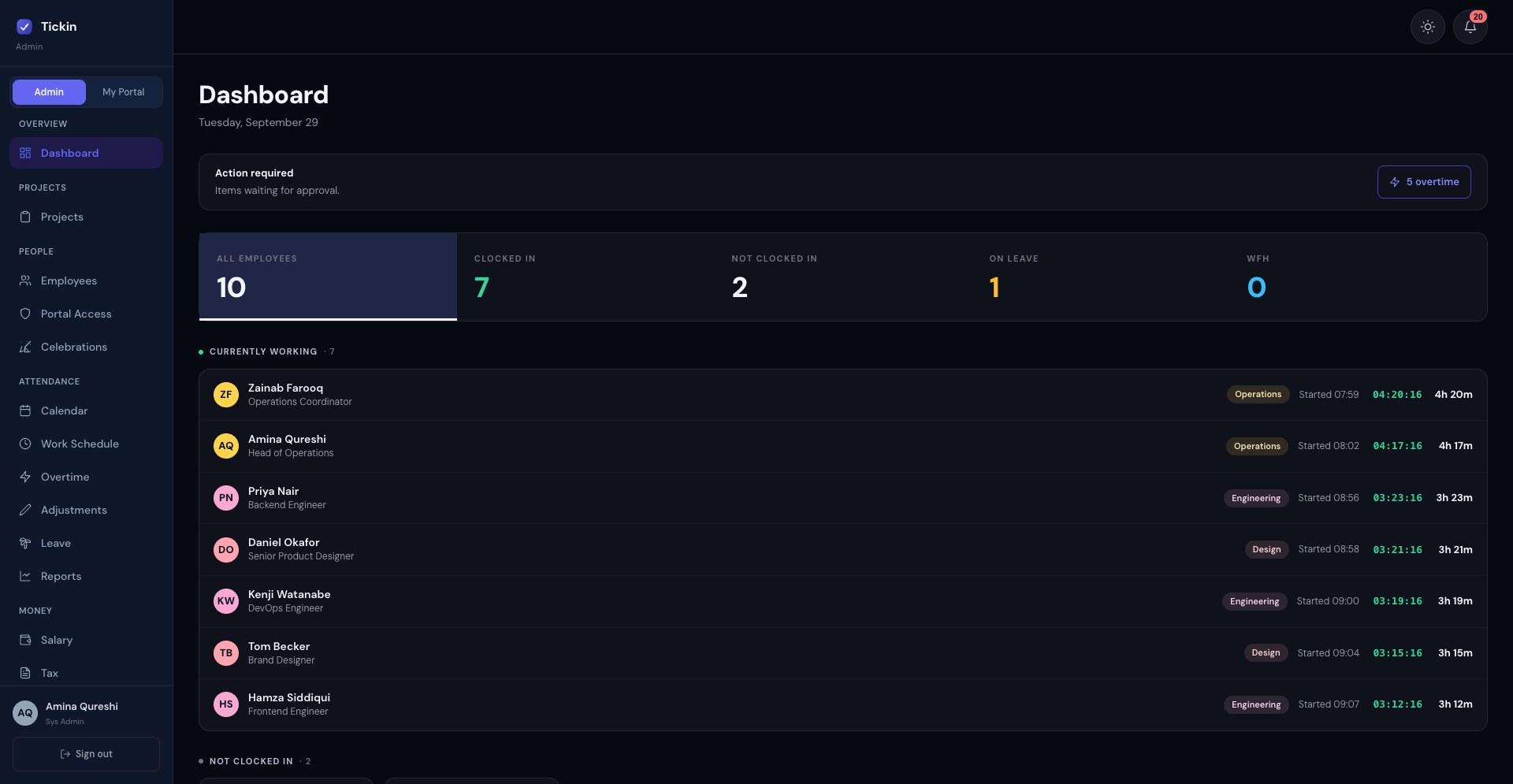
The Tickin admin dashboard: 10 employees, 7 clocked in, 2 not clocked in, 1 on leave, with live running timers for the seven currently working and five overtime items waiting for approval
New • Tickin Meet

Meet right inside Tickin.

Start secure video meetings without leaving Tickin. Schedule meetings, launch instant calls, collaborate with your team, manage attendees, and keep everything connected with your workspace.

  • Instant meetings
  • Scheduled meetings
  • Waiting room
  • Host transfer
  • Screen sharing
  • Meeting chat
  • Attendance tracking
  • Meeting history
  • Slack integration
  • Private, secure meeting links
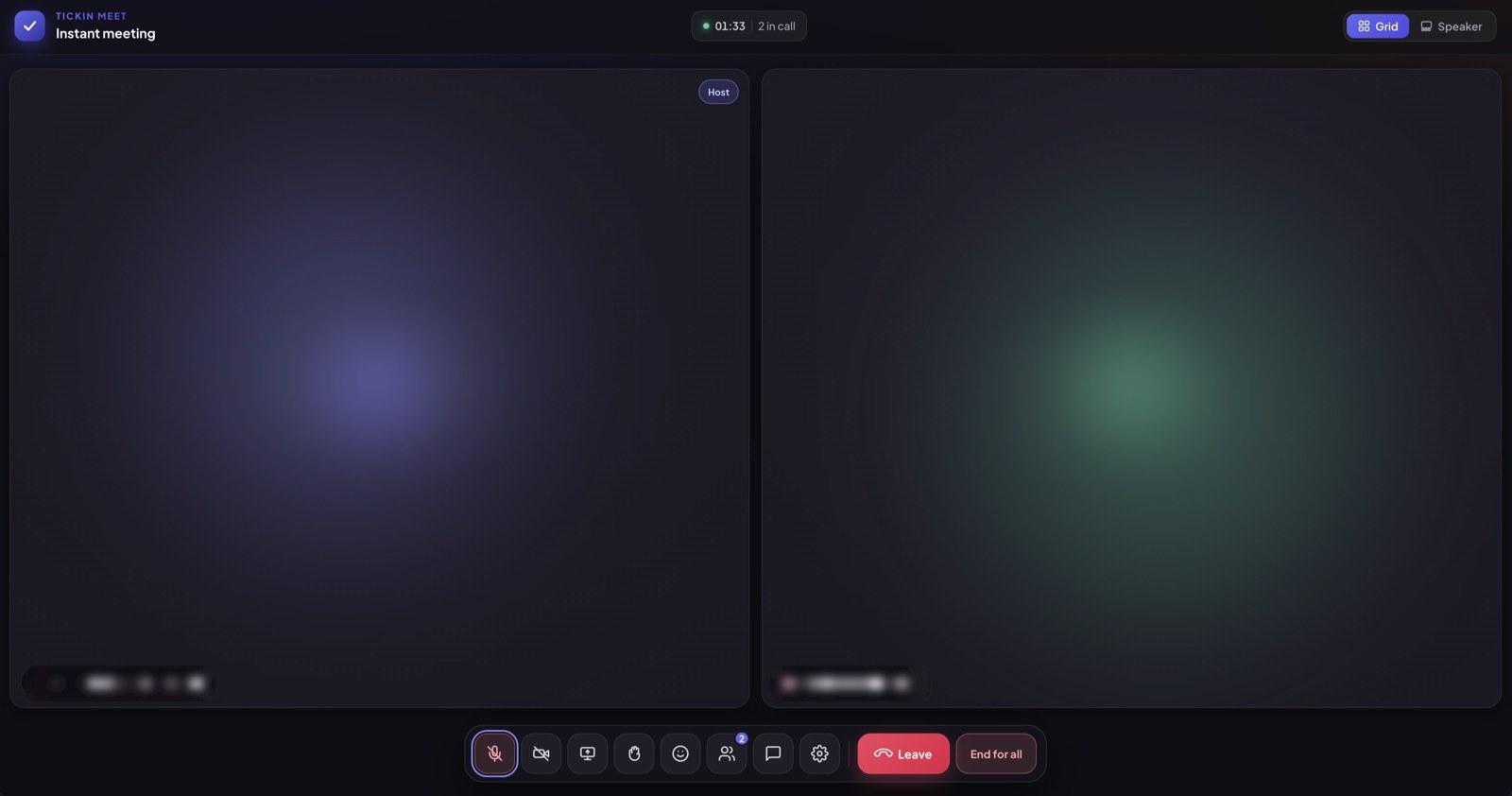
A Tickin Meet call in grid view: two participants, a running 01:33 timer, and controls for mute, camera, screen share, reactions, chat and leaving the call

Works with the tools your team already uses

SlackMicrosoft TeamsBrowserDesktop app
Why Tickin exists

Work moved into chat.
HR didn't.

Your team runs its whole day in Slack and Microsoft Teams. But attendance is still a spreadsheet, leave hides in DMs, and month-end is a scramble. Most HR software “fixes” this by adding one more app your team won't open.

Why most HR software fails

  • It's one more app to open — so employees quietly avoid it.
  • Attendance stays in a spreadsheet nobody keeps current.
  • Leave requests get lost in DMs and inboxes.
  • Hours live apart from payroll, so month-end is a scramble.

Why chat-first HR works

  • It lives in Slack, Teams, and the browser — nothing new to adopt.
  • People clock in and request leave with a single message.
  • Managers approve time and leave with one tap, in context.
  • Hours flow straight into reports and payroll — nobody re-types a number.

Don't make people come to HR. Bring HR to them.

Features

Everything you need to run people ops.

One platform for time, attendance, leave, overtime, payroll, and the projects your team is actually working on. Replace the spreadsheets, the email threads, and the three different tools your team has been gluing together.

Time & attendance

  • Time tracking & attendance

    Clock in from Slack, browser, or desktop. Set your office hours, working days, and timezone; sessions, hours, and daily breakdowns are tracked automatically, no manual timesheets.

  • Break tracking

    Toggle a break with /tickin break in Slack. Tickin pauses the work timer, subtracts break time from worked hours, and shows the daily total. So overtime stays honest.

  • Overtime detectionGrowth

    When an employee clocks out past your configured daily threshold, Tickin sends a Slack or Microsoft Teams DM with two buttons: continue (records as overtime) or cap the session. Work on a public holiday or a non-working day counts as overtime from the first minute. At month end, a reconciliation shows required hours, hours actually worked, how much approved overtime covered the shortfall, and what is left over as payable.

  • Office hours & late alerts

    Set office hours, a grace period, working days, and timezone. Clock in past the grace window and managers get a late-arrival notice in Slack or Teams, once per person per working day, skipping public holidays.

  • Idle detectionDesktop add-on

    The optional desktop app watches for keyboard and mouse activity. After 15 minutes of inactivity the session is marked idle, so you never overcount.

  • Monitoring, only if you want itDesktop add-on

    Productivity monitoring is off until you turn it on, and it takes two deliberate steps: the Desktop App add-on, then a switch only an admin can flip. Once on, you get app and website time by category, a day-by-day breakdown, week-over-week trends, and CSV export. Breaks and idle time are never captured, admins are never tracked, and on macOS no screenshot is taken unless the employee grants the permission themselves.

  • GPS attendance verificationDesktop add-on

    For teams that need clock-ins to happen on-site. Enter your office address, that is the only input: Tickin geocodes it and draws a geofence around it. Clock-ins inside the radius go through, outside are blocked, and if a device location cannot be read the entry is flagged for review rather than refused, so nobody is locked out by a bad GPS fix. Requires the Desktop App add-on, on any paid plan.

Payroll & leave

  • Payroll & payslipsGrowth

    Salary, deductions, and overtime calculated for you. Run payroll at the end of each pay period — monthly, or weekly on Scale — in a couple of clicks. Preview every figure first, then send each employee their payslip.

  • Leave management

    Custom leave policies and balances tracked automatically. On Growth and Scale, requests go to the team lead first, then an admin; on Free and Starter, an admin approves. No spreadsheets, no email threads.

  • Attendance corrections

    Missed a clock-in or got a time wrong? Employees request a correction and an admin signs off, with the team lead reviewing first on Growth and Scale. The audit trail follows.

  • Shift managementGrowth

    Design weekly schedules per department or per employee, overnight shifts included. Days, hours, and active state, visible to admins and team leads at a glance.

Projects & tasks

  • Project boardsScale

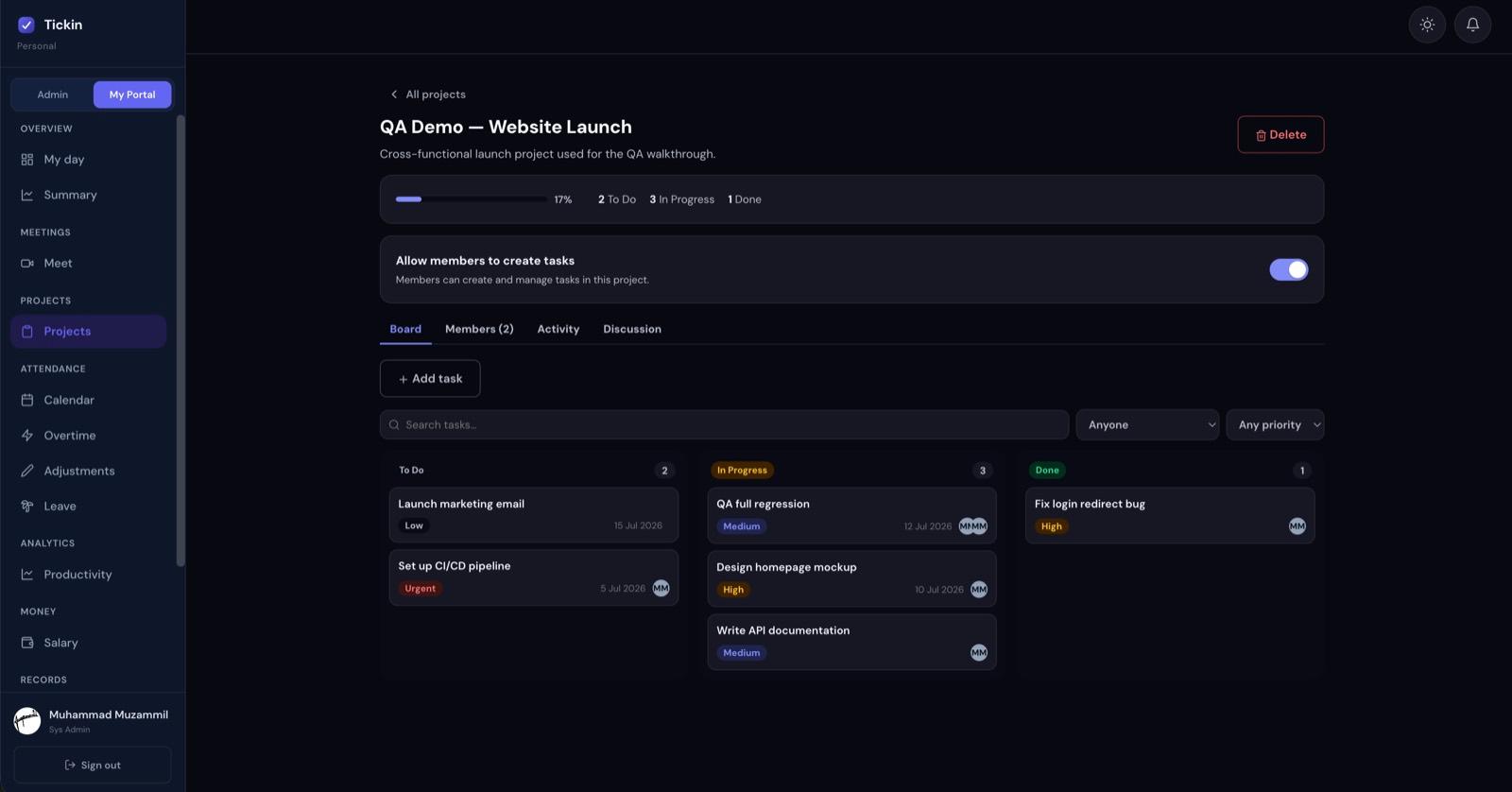
    Organize work into projects and drag tasks across To Do, In Progress, and Done. A clear board your whole team reads at a glance.

  • Rich tasksScale

    Priorities, due dates, multiple assignees, labels, and checklists that track sub-steps. Attach files, then search and filter to find anything fast.

  • Project time trackingScale

    Log hours against any task, with two-stage approval, team lead first, then admin. Billable, accountable time tied to the people already in your workspace.

  • Comments & dashboardsScale

    Comment with @mentions to loop teammates in, get notified in-app, Slack, and Microsoft Teams, and see time and progress by project, task, or person.

Team & insights

  • Multi-level approvalsGrowth

    Delegate without losing oversight. On Growth and Scale, leave and attendance corrections go to the team lead first, then an admin, and team leads see their team's flagged sessions. Admins approve overtime and keep final say on payroll.

  • Slack-native workflow

    The /tickin command (start, end, break, attendance, balance, leave) runs right in Slack, and overtime prompts arrive as DMs. Most of the day's tracking happens without opening the portal.

  • Reports & scheduled digests

    An automated daily Leave & WFH summary posts to Slack and weekly time-entry digests arrive by email; Growth adds monthly digests and emailed payslips. All are sent in your workspace timezone on working days only. Overtime, attendance, and leave data stay filterable by employee, department, or date range in the admin portal.

  • Audit logGrowth

    Every state change recorded, clock events, approvals, salary edits, invites. Browse the timeline by employee or event type when you need to know what happened.

Chat Command Center

Work where your team already works

One /tickin command runs attendance, leave, approvals, and reports right inside Slack and Microsoft Teams. It works the same on both, and adapts to each person's role.

# SlackT Microsoft Teams
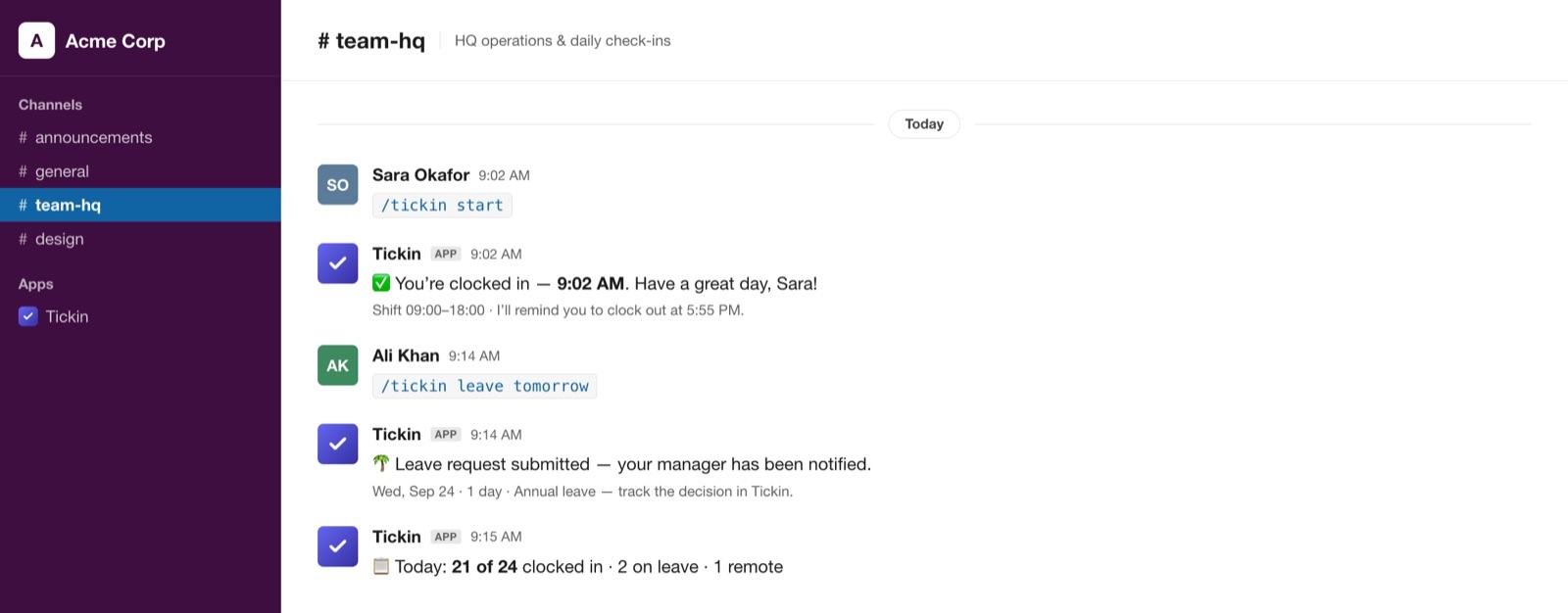
The Tickin bot in a Slack channel: Sara types /tickin start and the bot confirms she is clocked in at 9:02 AM with her shift and clock-out reminder, Ali types /tickin leave tomorrow and the bot confirms the request was submitted and her manager notified, then the bot posts a daily roll-up — 21 of 24 clocked in
Employee

Everything about your own day

  • Clock In
  • Clock Out
  • Start Break
  • End Break
  • Apply Leave
  • View Leave Balance
  • View Today's Summary
  • View Attendance History
  • View Schedule
  • View Profile
Team LeadGrowth & Scale

Run your team, approve in place

  • Team Dashboard
  • Employee Search
  • Employee Attendance
  • Leave Approval
  • Attendance Correction Approval
  • Team Attendance Summary
  • Team Leave Summary
  • Attendance Alerts
Administrator

The whole workspace, from chat

  • Organization Dashboard
  • Company Reports
  • Workspace Summary
  • Employee Directory
  • Attendance Analytics
  • Scheduled Reports

Managers see everything an employee can, for their team. Admins see everything, for the whole workspace. Permissions are enforced server-side.

How a leave request flows, without leaving chat

The team-lead step is on Growth and Scale. On Free and Starter, an admin approves directly.

  1. Request leaveEmployee
  2. Lead approvalTeam Lead
  3. Admin approvalAdministrator
  4. ApprovedSynced to Tickin

Work from Slack and Microsoft Teams

Clock-ins and employee self-service work in Slack on every plan. Interactive leave and correction approvals, attendance alerts, and scheduled reports come with the Chat Command Center. The team-lead role, its team dashboard, and two-step approvals (team lead, then admin) are on Growth and Scale; on Free and Starter an admin approves directly. Microsoft Teams is available on the Scale plan.

  • Slack integration
  • Microsoft Teams (Scale)
  • Interactive approvals
  • Attendance alerts
  • Scheduled reports
  • Employee self-service
  • Team dashboards
New · Microsoft Teams · Scale plan

Run the workday from Microsoft Teams.

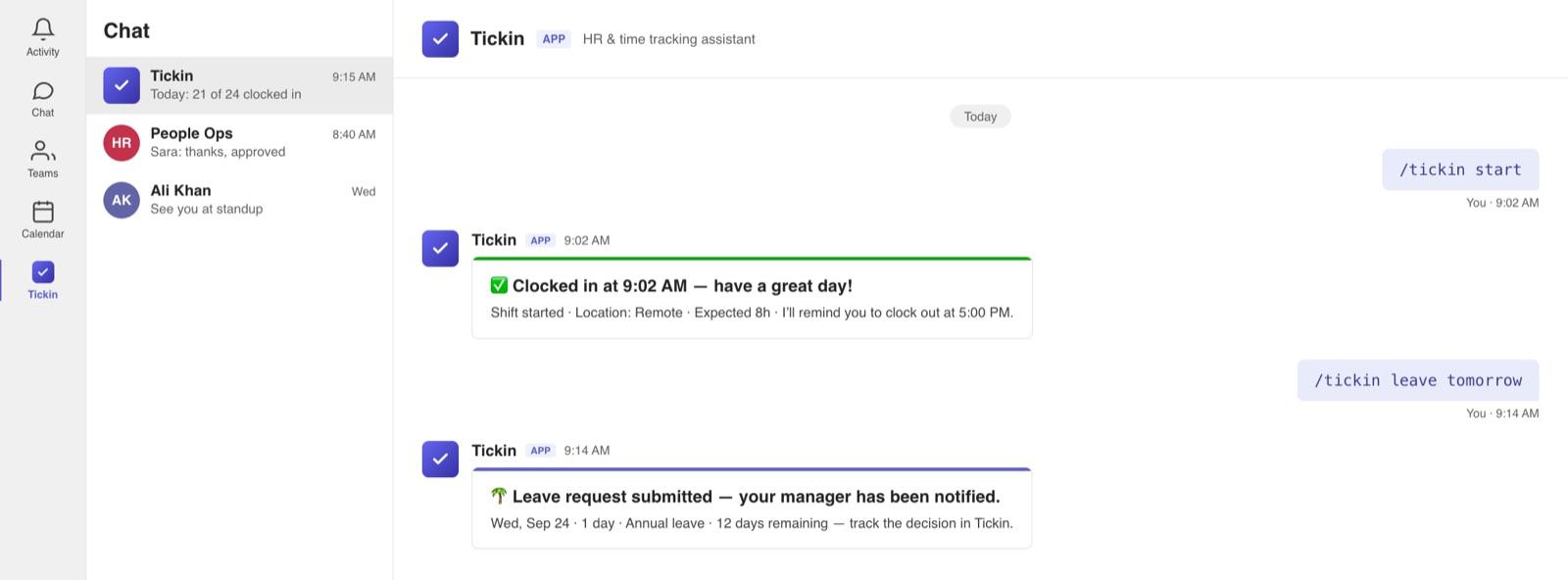
Clock in, take breaks, and request leave from the chat your team already lives in. One bot, set up once — every action flows straight back to Tickin.

  • Clock in and out, take breaks, check your leave balance, request time off, and view holidays — full command parity with Slack, right inside Teams.
  • A live attendance feed right in your team channel.
  • Get leave & overtime notifications in Teams — approve in Tickin.
  • One bot for the whole workspace — set up once.
The Tickin bot in Microsoft Teams: typing /tickin start returns a clock-in confirmation with shift details, and /tickin leave tomorrow returns a card confirming the request was submitted and the manager notified
Desktop add-on · Optional

Monitoring, only if you want it.

Productivity monitoring stays off until an admin turns it on, and it takes two deliberate steps: the Desktop App add-on, then a switch only an admin can flip. This is what an admin sees once both are done.

  • App and website time by category, a day-by-day breakdown, and week-over-week trends.
  • Nothing is captured during breaks or idle time, and admins are never tracked at all.
  • On macOS no screenshot is taken unless the employee grants the Screen Recording permission themselves.
  • Export any range to CSV. Switch it off and capture stops on every device within minutes.
How it works

From signup to payroll in four steps.

No implementation consultants. No 90-day rollouts. Tickin is opinionated on purpose, you get a working HR system from day one.

  1. 01

    Create your workspace

    Sign up with your email or Google account. Set your company name, currency, and country preset. No credit card. No setup calls.

  2. 02

    Invite your team

    Send invites by email. Assign each person a role: admin, team lead, or employee. Connect Slack so the team can clock in from any channel.

  3. 03

    Track work as it happens

    Your team clocks in from Slack, web, or desktop. Tickin captures hours, breaks via /tickin break, and idle time in the Desktop App. Overtime is confirmed at clock-out with a Slack DM.

  4. 04

    Approve, report, pay

    Review timesheets, approve leave, and run payroll in minutes. Preview every employee's figures, then send out their payslips.

Built on trust

Trust over surveillance.

Tickin is designed around trust, not surveillance. Attendance, leave, payroll, and time tracking all work without any screenshot monitoring — there are no forced screenshots and no keystroke logging.

Screenshot and activity monitoring are available as an optional module that is disabled by default. An admin can turn it on for the rare team that needs it — it is never our default identity.

  • Attendance
  • Hours worked
  • Leave & balances
  • Approvals
  • Payroll & tax presets
  • Reports

What Tickin measures — outcomes, not behavior.

Pricing

Simple pricing that scales with you.

Start free forever, up to 10 employees, no credit card. Upgrade to Starter, Growth, or Scale anytime from your billing settings.

Team size5
Desktop App+$2.40 / employee · idle & activity tracking
Tickin MeetNew+$16 / workspace · built-in video meetings

These switches only estimate the cost. Add-ons are turned on from Billing inside your workspace after you start a paid plan. Neither add-on is available on the Free plan.

Free

For small teams getting started

$0Free forever
No card requiredUp to 10 employees

Free forever for small teams. Upgrade only when you outgrow the cap.

Free plan includes:

  • Attendance, clock in/out (web + Slack)
  • Break tracking, auto-deducted
  • Leave management
  • Holiday calendars
  • Weekly digests + daily Slack leave report
  • Company dashboard + employee profiles
  • Attendance reports + corrections
  • Login verification on new devices
  • Trusted devices + active sessions
See all Free features
Start free

Starter

For teams past the 10-employee free cap

$1.60/ employee / month
Billed annuallyAny team size
Estimated totalfor 5 seats
$96/ year

billed yearly · $8 / month

Starter plan includes:

  • Unlimited employees, no cap
  • Any team size
  • Attendance, clock in/out (web + Slack)
  • Break tracking, auto-deducted
  • Leave management
  • Holiday calendars
  • Weekly digests + daily Slack leave report
  • Company dashboard + employee profiles
  • Attendance reports + corrections
  • Login verification on new devices
  • Trusted devices + active sessions
See all Starter features
Get started
Most popular

Growth

For growing teams running payroll

$2.40/ employee / month
Billed annuallyAny team size
Estimated totalfor 5 seats
$144.00/ year

billed yearly · $12.00 / month

Everything in Starter, plus:

  • Payroll & payslips (PDF + email)
  • Shift scheduling
  • Overtime detection + reconciliation
  • Custom pay items
  • Custom tax brackets
  • Multi-level approvals
  • Team dashboard + report emails
  • Data export (CSV) + audit log
See all Growth features
Get started
New

Scale

For teams running weekly pay and project work

$4.80/ employee / month
Billed annuallyAny team size
Estimated totalfor 5 seats
$288.00/ year

billed yearly · $24.00 / month

Everything in Growth, plus:

  • Weekly + hybrid pay cyclesPay some weekly, others monthly
  • Hourly & weekly rates
  • Weekly overtime
  • Auto-approve overtimeWith optional threshold
  • Projects & tasksAssign tasks to project membersLog time per task, with approvalsComments, checklists & file attachmentsProgress tracking & project dashboard
  • Microsoft Teams

Microsoft Teams needs a one-time admin setup.

See all Scale features
Get started

Optional add-ons

Billed separately · available on any paid plan

Desktop App

Idle time, activity tracking & GPS attendance verification

+$2.40/ seat / monthbilled annually

Tickin Meet

Built-in video meetings

+$16/ workspace / monthbilled annually

Add-ons are purchased from Billing once you are on a paid plan. Neither add-on is available on the Free plan.

No hidden feesTransparent pricing always
Cancel anytimeNo lock-in or contracts
Secure by designYour data is always protected
Human supportWe're here to help

Free forever up to 10 employees · Save 20% with annual billing · Cancel anytime

Compare Plans

Compare plans feature by feature

Choose the plan that fits your organization. Every feature shown below reflects the actual capabilities available in Tickin.

Feature comparison across the Free, Starter, Growth and Scale plans.
FeaturesFree$0Free — up to 10Starter$1.60/ emp / mobilled annuallyMost popularGrowth$2.40/ emp / mobilled annuallyScale$4.80/ emp / mobilled annually
Workforce
Attendance
Break tracking
Leave management
Shift scheduling
Holiday calendars
Overtime management
Monthly overtime reconciliationA 1st-of-month snapshot that reconciles the month just closed
EmployeesUp to 10 employeesUnlimitedUnlimitedUnlimited
Projects
Projects & tasks
  • Project members
  • Project time tracking
  • Project dashboard
Payroll
Salary slips
Custom pay items (allowances & deductions)
Custom tax brackets
Weekly & hybrid pay cyclesPay some employees weekly and others monthly, in one workspace
Hourly & weekly rates
Weekly overtimeOvertime approved by the week, alongside the monthly cycle
Automatic overtime approvalOptional hours limit — anything above it still needs a person
Communication & Meetings
Slack integration
Microsoft Teams integration
Tickin MeetBuilt-in video meetings — billed per workspaceOptional Add-onOptional Add-onOptional Add-on
Productivity
Desktop appBilled per employee
  • Idle time tracking
  • Activity tracking
  • GPS attendance verification
Optional Add-onOptional Add-onOptional Add-on
HR & Management
Approval workflowSingle approvalSingle approvalMulti-level approvalMulti-level approval
Attendance adjustments
Company dashboard
Team dashboard
Employee profiles
Attendance reports
Weekly report emails
Monthly report emails
Data export (CSV)
Audit log
Email support
Security
Active sessions
Trusted devices
Login verification (email code on new devices)

Desktop App and Tickin Meet are optional add-ons, purchased separately from Billing. Neither is available on the Free plan.

Still not sure?

Book a demo and we'll recommend the right plan for your team.

New · Projects

Run projects, and track the time they take.

Project & task management, built right into the platform that already runs your team's attendance and payroll. One login, no extra tool.

  • Visual boards — drag tasks from To Do to Done, with priorities, labels & assignees.
  • Checklists, file attachments, and comments with @mentions.
  • Log time on tasks with two-stage approval — team lead, then admin.
  • Dashboards by project, task & person, plus Slack and Teams notifications.
A Tickin project board: tasks in To Do, In Progress and Done columns with priorities, due dates and assignees, above a completion bar
FAQ

Questions, answered.

Still curious? Reach out, we read every message.

info@tickin.pro
  • Most teams are fully onboarded within an afternoon. Create your workspace, invite your team, connect Slack, and you're done. No implementation consultants required.

Ready to give your team an HR system they'll actually use?

See Tickin in a 20-minute demo. We'll show you exactly how it works with your team setup, no fluff.