Do Breaks Count as Hours Worked? How Break Tracking Should Work
Do breaks count as hours worked? Learn how paid vs unpaid breaks affect net worked time, how to deduct breaks fairly, and how to track it all without friction.
A team lead once told me their payroll was off by almost an hour per person, every single week. Nobody was lying. People just clocked out for lunch on some days, forgot on others, and took a coffee break here and there that nobody wrote down. Multiply that by twelve people and a month, and suddenly you are paying for hours that never happened, or shorting people who worked through lunch. The culprit was not dishonesty. It was that nobody had a clear answer to a deceptively simple question: do breaks count as hours worked?
The honest answer is "it depends," but it depends on things you can actually pin down. Once you know the difference between paid and unpaid breaks and how net worked time is calculated, the whole thing stops feeling murky.
TL;DR
- Paid breaks (short rest breaks, coffee runs, on-call downtime) count as hours worked and stay in the paid total.
- Unpaid breaks (a real meal break where someone is fully off duty) get subtracted before you calculate pay or overtime.
- Net worked time = gross time from clock in to clock out, minus unpaid breaks, minus idle time.
- Consistency matters more than any single rule. Pick a policy, write it down, apply it the same way for everyone.
- Automatic idle detection plus manual break logging gives you numbers people actually trust.
The core distinction: paid vs unpaid breaks
Every break falls into one of two buckets, and the bucket decides everything.
A paid break is time the company still pays for even though the person stepped away from active work. Think of a five-minute stretch, a coffee refill, or a quick breather between calls. The person is still effectively on the clock and available.
An unpaid break is time the person is genuinely relieved of all duties, long enough to use however they like. The classic case is a lunch break of 30 minutes or more where someone leaves their desk, is not expected to respond, and can go for a walk or eat away from work.
The general principle most labor frameworks share is straightforward. Short rest breaks tend to be paid and counted as work. Longer meal breaks, when the person is fully off duty, tend to be unpaid and deducted. You can read more about how break time is treated across different systems, but the underlying logic is remarkably consistent worldwide.
| Break type | Typical length | Person available? | Counts as worked? | Paid? |
|---|---|---|---|---|
| Rest break | 5-15 min | Yes, loosely | Yes | Yes |
| Coffee or stretch | A few minutes | Yes | Yes | Yes |
| Meal break | 30-60 min | No, fully off duty | No | No |
| On-call waiting | Varies | Yes, must respond | Yes | Yes |
| Personal errand mid-shift | Varies | No | No | No |
The gray area is the meal break where someone half-works. If a person eats at their desk while answering messages, that is not a real break, and it usually should be paid. The test is simple: were they actually free? If the answer is no, it counts.
How net worked time is calculated
Once you know which breaks are unpaid, the math is clean. Net worked time is what you pay for, and it comes from three pieces.
- Gross time: the full span from clock in to clock out.
- Unpaid breaks: meal breaks and off-duty time you subtract.
- Idle time: stretches with no activity that were never logged as a break.
Put together:
Net worked time = gross time − unpaid breaks − idle time
Paid breaks never enter this equation as a subtraction, because they are already part of what you owe. That is the part people get wrong most often. They deduct every single pause, including the paid ones, and then wonder why staff feel cheated.
Idle time is the trickiest input. If someone forgets to log a lunch break, the gap still needs handling, otherwise you pay for an empty hour. Good break tracking catches these quietly rather than forcing you to audit every timesheet by hand. In Tickin that handling sits inside time tracking itself, so unpaid breaks come out of the total as the day is recorded — the alternative is reconstructing a month of half-remembered lunches at the end of it.
Why idle detection matters
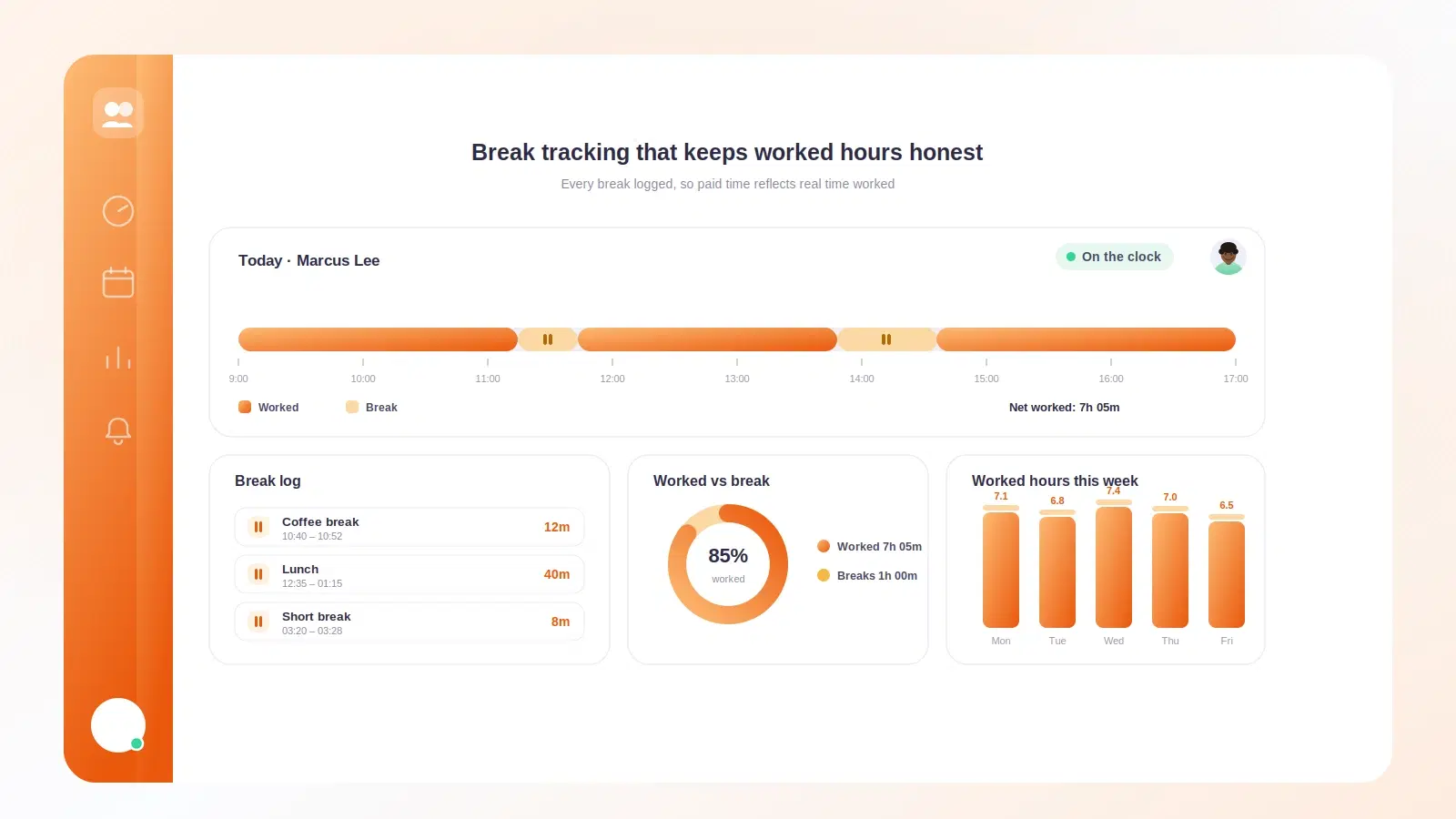
Manual logging is honest but leaky. People forget. Idle detection acts as a backstop. If a laptop sees no keyboard or mouse activity for, say, 20 minutes during a period nobody marked as a break, that gap can be flagged for review. You are not accusing anyone. You are just making sure the number reflects reality.
The healthiest setup combines both. Let people start and stop their own breaks, and let the system gently surface gaps that were never accounted for. This pairs well with a broader time tracking approach for small businesses that favors trust over surveillance.
A worked example with real numbers
Let me walk through one person's day so the deductions stop being abstract.
Priya clocks in at 9:00 and clocks out at 18:00. That is a gross span of 9 hours.
During the day:
- She takes a 45-minute lunch and leaves her desk entirely. Unpaid.
- She takes two 10-minute coffee breaks. Paid, because they are short rest breaks.
- The system flags 15 minutes of idle time in the afternoon that she forgot to log. On review, it turns out she stepped out for a call. Unpaid.
Here is how the day resolves:
| Item | Duration | Treatment |
|---|---|---|
| Gross span (9:00 to 18:00) | 9h 00m | Starting point |
| Lunch break | 45m | Subtract (unpaid) |
| Two coffee breaks | 20m | Keep (paid) |
| Idle time, unlogged call | 15m | Subtract (unpaid) |
Net worked time = 9h 00m − 45m − 15m = 8h 00m.
Notice the coffee breaks stayed in. If you had wrongly deducted them too, Priya would have been paid for 7h 40m instead of 8h, losing 20 minutes she was entitled to. Over a month that is roughly 7 hours of unpaid work, which is exactly the kind of quiet erosion that makes good people quit.
This same net figure is what feeds into overtime. If Priya's day had run to 8:00 with proper breaks handled, only the genuine worked hours beyond the threshold would count. If you are unsure how that step works, our guide on how to calculate overtime pay walks through the thresholds and multipliers.
Fairness and trust
Break tracking has a reputation problem. Done badly, it feels like a manager standing over your shoulder counting the seconds you spend getting water. Done well, it is the opposite. It protects people.
Here is the reframe. Clear break rules mean nobody has to argue about their hours at the end of the month. The numbers are visible, the policy is written down, and the same logic applies to everyone from the newest hire to the founder. That predictability is what builds trust.
A few principles keep it fair:
- Write the policy down. State which breaks are paid, which are unpaid, and how long the meal break is. Ambiguity always gets resolved in someone's favor, and resentment follows.
- Apply it evenly. If one person's lunch is deducted, everyone's is. Selective enforcement is the fastest way to lose a team's goodwill.
- Make the data visible to the person. People should see their own break log and net hours in real time, not discover a surprise deduction on payday.
- Assume good faith on gaps. Treat an unlogged idle stretch as a question, not an accusation. Most of the time there is an innocent reason.
When people can see exactly how their hours are built, break tracking stops being a source of suspicion and becomes a source of confidence.
How Tickin handles break tracking
This is the one place I will talk about our own product. Tickin is built so break tracking runs quietly in the background instead of becoming a daily chore.
People start and stop breaks with a single tap or a quick message in Slack, so there is no separate app to open. Every break is tagged as paid or unpaid according to your policy, and Tickin does the net worked time math for you: gross span, minus unpaid breaks, minus flagged idle time. The optional Desktop App adds gentle idle detection as a backstop, so forgotten lunches get surfaced for a quick review rather than silently inflating payroll.
Because the same logic feeds attendance, timesheets and payroll, the number you see on a report is the number people get paid for. No reconciliation, no spreadsheet gymnastics. You can set it up free for up to 10 people and see how it fits your team at our signup page, or browse the full feature list first. If most of your team already lives in Slack, our walkthrough on how to track time in Slack shows exactly how clocking in and taking breaks works there.
Frequently asked questions
Do paid breaks count as hours worked?
Yes. Paid breaks are counted as part of worked time, so they are included in the hours you pay and often in overtime calculations. Short rest breaks usually fall into this category.
Do unpaid breaks count toward overtime?
No. Unpaid breaks are subtracted from worked time before overtime is calculated, so a genuine meal break where someone is fully relieved of duty does not add to the hours that push someone into overtime.
What is net worked time?
Net worked time is the hours you actually pay for. You take the gross span from clock in to clock out, then subtract unpaid breaks and any idle time to get the net figure.
Should I track breaks automatically or let people log them?
A mix works best. Let people start and stop breaks themselves for honesty, and use gentle automatic prompts or idle detection as a backstop so nothing gets missed.
Is a short coffee break unpaid?
Usually not. Brief breaks of a few minutes are commonly treated as paid worked time, while longer meal breaks where the person is off duty are the ones that get deducted.
Getting it right without the headache
The whole question of whether breaks count as hours worked comes down to two decisions you make once and apply consistently. Decide which breaks are paid and which are unpaid, then calculate net worked time as gross minus unpaid breaks minus idle. Everything else is just applying that rule fairly and letting the tooling handle the arithmetic.
Get this right and you stop overpaying, stop shortchanging your team, and stop having awkward conversations about missing minutes. The numbers just add up, month after month.
Ready to stop guessing at your hours? Start for free with Tickin and let break tracking run itself, then read how to calculate overtime pay to see how those net hours flow into the rest of payroll.