Clockify Alternatives: 7 Time Trackers Compared (2026)
Seven Clockify alternatives compared on free plans, starting prices and what each is best at, from Toggl Track and Harvest to Jibble, Connecteam and Tickin.
Clockify is one of the most popular time trackers for good reason: it is simple, it has a free plan, and it does the core job well. Teams start looking elsewhere for specific reasons, and the right alternative depends on which one is yours.
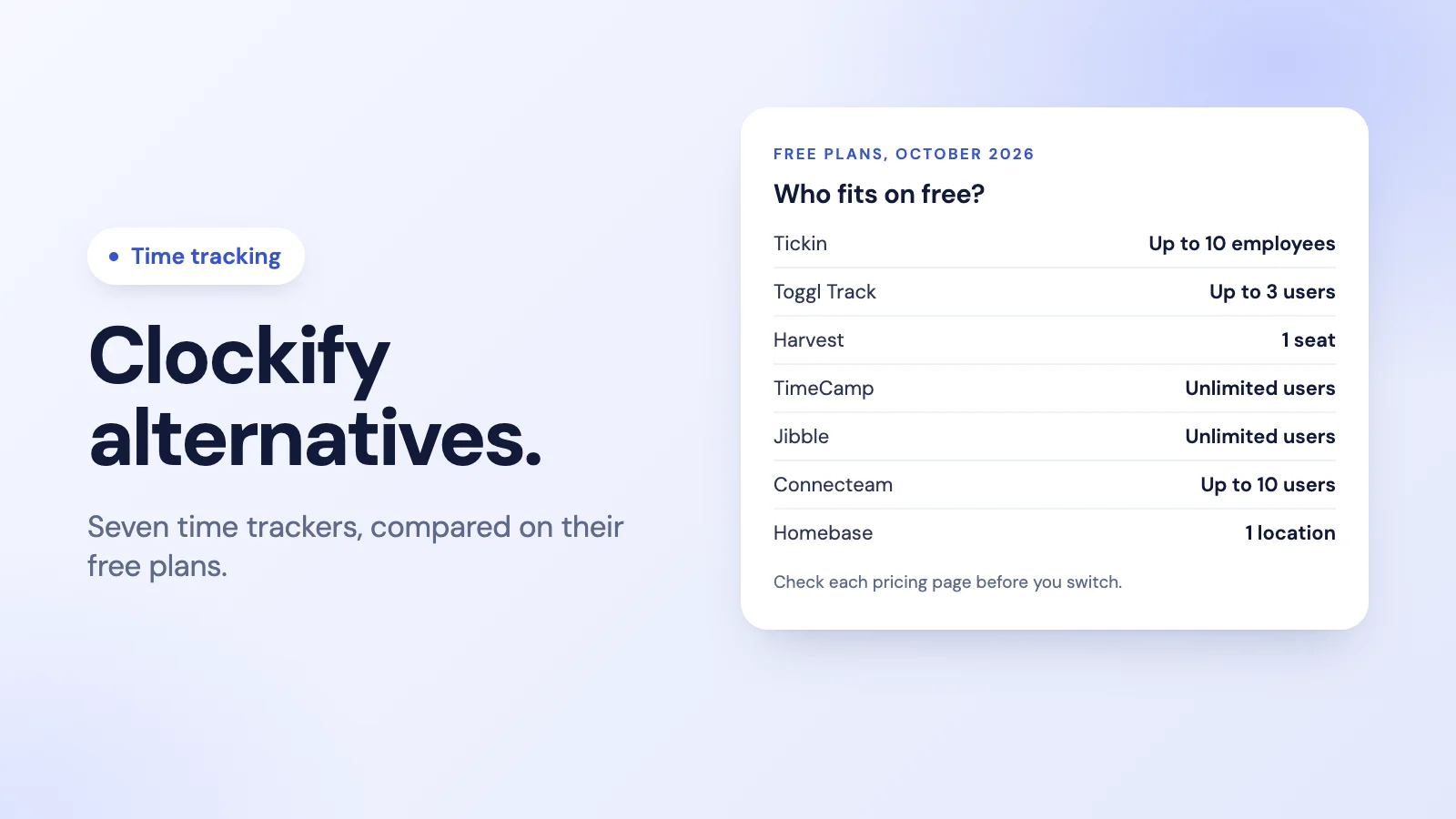
This guide compares seven alternatives on what matters when you switch: the free plan, the starting price and what each tool is actually built for. Prices and plan limits come from each company's own pricing page as of October 2026, and they change, so check before you commit.
Why teams move on from Clockify
- The free plan stops at 5 users. Clockify's free plan covers up to 5 users. A team of six or more needs a paid plan, which starts at $3.99 per user a month billed annually ($4.99 monthly).
- They need more than hours. Clockify tracks time well. Kiosk clock-in, time off and approvals are on its paid plans, and payroll is outside it. Teams that want attendance, leave and pay in one place often look at all-in-one tools.
- The work is shift-based, not project-based. Project time trackers are built around timers and projects. Shift and hourly teams usually care more about clock-ins, breaks, schedules and lateness.
Knowing which of these is your reason narrows the list quickly.
The 7 alternatives at a glance
| Tool | Free plan | Paid plans from | Best for |
|---|---|---|---|
| Tickin | Up to 10 employees | $2 per employee a month | Attendance, leave and payroll from Slack or Teams |
| Toggl Track | Up to 3 users | $9 per user a month, billed annually | A fast, polished timer for small teams |
| Harvest | 1 seat, 2 projects | $9 per seat a month | Time tracking and client invoicing |
| TimeCamp | Unlimited users | $3.99 per user a month, billed annually | Project time on a budget |
| Jibble | Unlimited users | See Jibble's pricing page | Clock-ins for large and field teams |
| Connecteam | Up to 10 users | $29 a month for the first 30 users | Deskless teams who also need scheduling and chat |
| Homebase | 1 location, up to 10 employees | $30 per location a month | Hourly teams in shops, cafés and restaurants |
1. Tickin: attendance, leave and payroll where your team already works
Tickin is built for teams who need to know when people work, rather than which client a minute belongs to. People clock in with /tickin start in Slack, @Tickin start in Microsoft Teams on the Scale plan, or in the browser. Breaks are deducted, leave is requested and approved in the same tool, and a dashboard shows who is working, on a break or on leave.
It is free for up to 10 employees. Starter is $2 per employee a month and Growth is $3, which adds shift scheduling, overtime pay, payslips and CSV export. Scale is $6 and adds Microsoft Teams, projects and weekly pay. Annual billing saves 20%.
There is no separate phone app: on a phone, people use the Slack app, the Teams app on Scale, or the mobile browser. See Tickin vs Clockify for a side-by-side comparison.
2. Toggl Track: a fast timer for small teams
Toggl Track is known for a clean, quick timer. Its free plan is for up to 3 users, with manual and real-time timers, calendar integrations and simple planning with tasks and boards. Paid plans start at $9 per user a month billed annually ($12 monthly), adding billable rates and team reports; timesheet approvals are on its Premium plan.
It suits a founder or a small team who want the quickest possible way to log time against work.
3. Harvest: time tracking plus invoicing
Harvest pairs time tracking with invoicing and expenses, which makes it popular with agencies and consultants who bill by the hour. The free plan is one seat and two projects. Paid plans start at $9 per seat a month, and its Enterprise plan adds timesheet approvals.
If your main question is "what do we invoice this client", Harvest is a strong fit. If it is "who is in today", look further down this list.
4. TimeCamp: project time on a budget
TimeCamp's free-forever plan includes unlimited users and unlimited projects, with timesheets and web, desktop and mobile apps. Paid plans start at $3.99 per user a month billed annually ($5.49 monthly) and add attendance, time off and invoicing.
It is a close like-for-like swap for teams who liked Clockify's project tracking but need more free seats.
5. Jibble: clock-ins for large and field teams
Jibble describes itself as free forever for unlimited users. It is built around clock-ins rather than project timers, with mobile and web clock-ins and features aimed at field and shift teams. Check its pricing page for the current paid plans.
It suits large teams who mainly need attendance and can live with a separate tool for leave and pay. See Tickin vs Jibble.
6. Connecteam: an app for deskless teams
Connecteam is a mobile-first app for deskless teams, with a time clock alongside scheduling and team chat. Its free Small Business plan covers up to 10 users. Paid plans are priced as a flat monthly fee for the first 30 users, starting at $29 a month, plus a per-user charge beyond that.
It suits field, retail and construction teams who need a phone app first. See Tickin vs Connecteam.
7. Homebase: hourly teams by location
Homebase is built for hourly teams in shops, cafés and restaurants, priced per location rather than per user. The free plan covers one location with up to 10 employees, with basic scheduling and time tracking. Paid plans start at $30 per location a month.
It suits a single-site business with a shift rota. See Tickin vs Homebase.
How to choose
- Start with your reason for leaving. More free seats points to TimeCamp or Jibble. Attendance, leave and pay together point to an all-in-one tool. Client invoicing points to Harvest.
- Count your people, not this year's, next year's. A free plan that fits today may not fit in six months.
- Check where your team works. A team in Slack or Teams all day will use a tool that lives there. A deskless team needs a phone app.
- Try it with real people for a week. A clock-in nobody remembers to use gives you no data at all.
- Read the current pricing page. Plans and limits change; the figures here are from October 2026.
For a wider look at free options, see the best free time tracking tools, and if you are moving from timers to timesheets, our guide to timesheet software for small businesses.
Moving from Clockify to Tickin
Tickin tracks time from the moment someone clocks in to the moment they clock out, with breaks deducted, rather than against projects and clients. Getting started is a short list: invite your people, set your working days and office hours, and connect Slack, and they can clock in from there straight away. Read more about time tracking in Tickin and employee timekeeping.
Frequently asked questions
Why do teams look for a Clockify alternative?
Usually for one of three reasons: the team has grown past the free plan's 5 users, they need attendance, leave or payroll alongside time tracking, or they want a tool built for shift and hourly teams rather than project time.
What is the best free alternative to Clockify?
For headcount, Jibble and TimeCamp both offer free plans with unlimited users. For attendance and leave in one tool, Tickin is free for up to 10 employees. Connecteam's free plan covers up to 10 users and Homebase's covers one location with up to 10 employees.
How many users does Clockify's free plan allow?
Clockify's pricing page lists its free plan for up to 5 users, as of October 2026. Larger teams move to a paid plan, which starts at $3.99 per user a month billed annually.
Which Clockify alternative is best for billing clients?
Harvest is built around time and invoicing, and Toggl Track and TimeCamp both offer billable rates on paid plans. Tickin is built for attendance, leave and payroll rather than client invoicing.
Is Tickin a Clockify alternative?
For teams who mainly need to know when people work, yes: clock-in and out from Slack, the web or Microsoft Teams on the Scale plan, with leave and payroll in the same tool. For tracking billable hours against clients and projects, a project time tracker is the closer match.
The takeaway
There is no single best Clockify alternative, only the best one for your reason for leaving. Pick the tool built for the job you actually do: project time and invoicing, clock-ins at scale, shifts by location, or attendance, leave and pay in the chat your team already uses.