6 Best Free Time Tracking Tools for Small Teams (2026)
The best free time tracking tools for small teams in 2026, compared on what each free plan actually includes: user limits, timesheets, apps and what is paid.
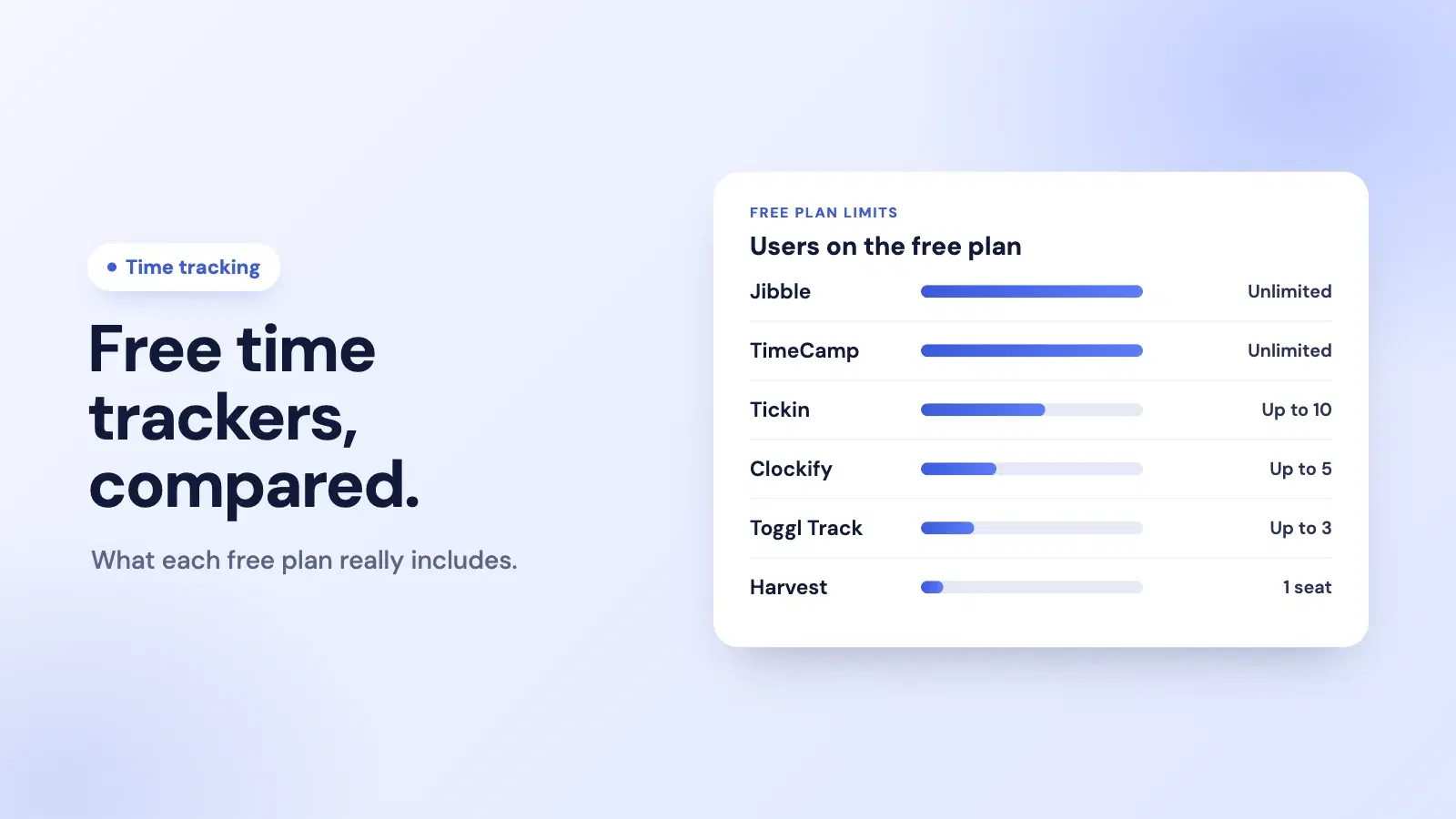
A free time tracker is only free if it fits your team. Some free plans stop at one person, some at three or five, and a few have no user limit at all. What each one leaves for its paid plans matters as much as the price.
This guide compares six tools on what their free plans include, taken from each company's own pricing page as of September 2026. Plans change, so check the current terms before you commit.
TL;DR
- Largest free plans: Jibble and TimeCamp, both with unlimited users.
- Time tracking plus attendance and leave: Tickin, free for up to 10 employees, run from Slack or the browser.
- Polished solo and small-team trackers: Clockify (up to 5 users), Toggl Track (up to 3) and Harvest (1 seat, 2 projects).
- Decide by team size first, then by the one feature you cannot do without.
The free plans at a glance
| Tool | Free plan limit | What the free plan includes | Paid plans from |
|---|---|---|---|
| Jibble | Unlimited users | Desktop time tracking, mobile and web clock-ins, basic timesheets, integrations with Slack, Microsoft Teams and QuickBooks | See Jibble's pricing page |
| TimeCamp | Unlimited users and projects | Timesheets, web, desktop and mobile apps, AI time tracker, two-factor authentication | $3.99 per user a month billed annually ($5.49 monthly) |
| Tickin | Up to 10 employees | Clock-in from Slack and the web, break tracking, leave management, company dashboard, attendance reports and corrections | $2 per employee a month (Starter) |
| Clockify | Up to 5 users | Unlimited tracking, timer, timesheet, auto tracker, calendar, mobile and desktop apps, reports | $3.99 per user a month billed annually ($4.99 monthly) |
| Toggl Track | Up to 3 users | Manual and real-time timers, calendar integrations, simple planning, personal reports | $9 per user a month billed annually ($12 monthly) |
| Harvest | 1 seat, 2 projects | Time tracking, invoicing, expense tracking, Mac and iOS apps | $9 per seat a month ($108 per seat billed annually) |
Sources: each company's own pricing page, September 2026.
1. Jibble: unlimited users, built around clock-ins
Jibble's free plan is the most generous on this list for headcount: its pricing page says it is free for unlimited users, with desktop time tracking, mobile and web clock-ins, basic timesheets and integrations with Slack, Microsoft Teams and QuickBooks. It suits teams that mainly need to know when people clocked in and out, including field and shift teams.
For a side-by-side view, see Tickin vs Jibble.
2. TimeCamp: unlimited users and projects
TimeCamp's free-forever plan includes unlimited users and unlimited projects, timesheets, and web, desktop and mobile apps, which makes it a strong choice for teams that track time against projects. Paid plans start at $3.99 per user a month billed annually.
3. Tickin: time tracking with attendance and leave, from Slack
Tickin is free for up to 10 employees and covers more than a timer: people clock in with /tickin start and out with /tickin end in Slack, or in the browser, breaks are deducted automatically, leave is requested and approved in the same tool, and a company dashboard shows who is working. The Free plan does not include payroll, which is on the Growth plan, and there is no separate phone app: on a phone, people use the Slack app or the mobile browser. It fits small teams that live in Slack and want attendance and leave without a second tool. See Tickin's free time tracker.
4. Clockify: a polished tracker for up to 5 users
Clockify's free plan covers up to 5 users with unlimited tracking, a timer, timesheets, an auto tracker, calendar view, reports and mobile and desktop apps. Kiosk clock-in, time off, approvals and invoicing are on its paid plans, which start at $3.99 per user a month billed annually.
For a side-by-side view, see Tickin vs Clockify.
5. Toggl Track: simple and fast, for up to 3 users
Toggl Track's free plan is for up to 3 users, with manual and real-time timers, calendar integrations, simple planning and personal reports. It is a good fit for a founder or a very small team who want the quickest possible timer. Paid plans start at $9 per user a month billed annually.
6. Harvest: time plus invoicing, for one person
Harvest's free plan is one seat and two projects, with time tracking, invoicing and expense tracking. That makes it best for a freelancer or consultant who bills clients for their time, rather than for a team. Paid plans start at $9 per seat a month.
How to choose a free time tracker
- Count the people. A free plan that stops at three users is not free for a team of eight. Start with the tools whose limit you will not hit this year.
- Name the one feature you need. Approvals, kiosk clock-in, time off, invoicing and payroll exports are the usual paid extras.
- Check where your team already works. A tracker in the tool people already have open, such as Slack, gets used; a separate app often does not. Our guide to time tracking in Slack covers how that works.
- Plan for the next step. If hours need to become pay, check how the tracker gets them into payroll, and what the paid plan costs at your size.
If you would rather keep a spreadsheet for now, our free weekly timesheet template is a good place to start, and our guide to employee timekeeping covers what a time record has to capture.
Frequently asked questions
What is the best free time tracking tool?
It depends on team size and what you need beyond a timer. Jibble and TimeCamp have free plans with unlimited users; Tickin is free for up to 10 employees and adds attendance and leave; Clockify is free for up to 5 users, Toggl Track for up to 3, and Harvest for one person with two projects.
Is there a completely free time tracker for a whole team?
Yes. Jibble's free plan and TimeCamp's free plan both allow unlimited users, according to their pricing pages as of September 2026. Others cap the free plan at a number of users, from one seat on Harvest to 10 employees on Tickin.
What do free time tracking plans usually leave out?
Approvals, kiosk or GPS clock-in, time off management, invoicing, advanced reports and integrations are the most common paid extras. Check the free plan's feature list against the one or two things you actually need before you roll it out.
Do free time trackers work for payroll?
Most free plans record hours and export timesheets, which your payroll then uses. Few connect hours to payroll directly on the free plan. Tickin runs payroll from its own hours on the paid Growth plan; on its Free plan it records time, attendance and leave.
The takeaway
The best free time tracker is the one your whole team fits into and will actually use. For large teams on a budget, start with Jibble or TimeCamp. For a small team in Slack that also wants attendance and leave, Tickin is free for up to 10 people. For one person or a handful, Clockify, Toggl Track and Harvest are all polished choices. Whichever you pick, check the current free-plan terms on the company's own pricing page before you roll it out.