Free Time Log Template (Daily and Weekly)
Two free time log templates as CSV files: a daily log of what you worked on and when, and a weekly summary by project. How to fill them in, with a worked example.
A time log is the simplest way to answer a question most people get wrong: where did my time actually go? Write down what you worked on and when, add it up at the end of the day or week, and the gap between what you planned and what happened becomes obvious.
Here are two free templates, a daily log and a weekly summary, with a worked example of each.
Download the templates
- Daily time log (CSV): one row per block of work, with start, end, activity, project and hours.
- Weekly time log (CSV): hours per project for each day of the week, with daily and weekly totals.
Both open in Excel, Google Sheets, Numbers or any spreadsheet app. The sample rows show how they work; replace them with your own.
Time log or timesheet?
They are often confused, but they answer different questions:
- A timesheet records when someone started and finished work each day and the hours in between, usually for pay. If that is what you need, use our free timesheet template.
- A time log records what the time was spent on, activity by activity. It is for understanding and planning work, or billing clients by project.
Many teams keep both: a timesheet for pay, and a time log for projects.
How to fill in the daily log
Each row is one block of work:
| Column | What to enter |
|---|---|
| Date | The day, for example Tue 2026-11-10 |
| Start and End | The block's start and end time, in 24-hour format |
| Activity | What you did, in a few words |
| Project or client | Who or what it was for; use "Internal" for everything else |
| Hours | End minus start, as decimal hours (45 minutes is 0.75) |
| Notes | Anything worth remembering, such as a break you did not log |
Breaks and lunch are simply gaps between rows, so the hours only count time spent working.
Worked example: one Tuesday
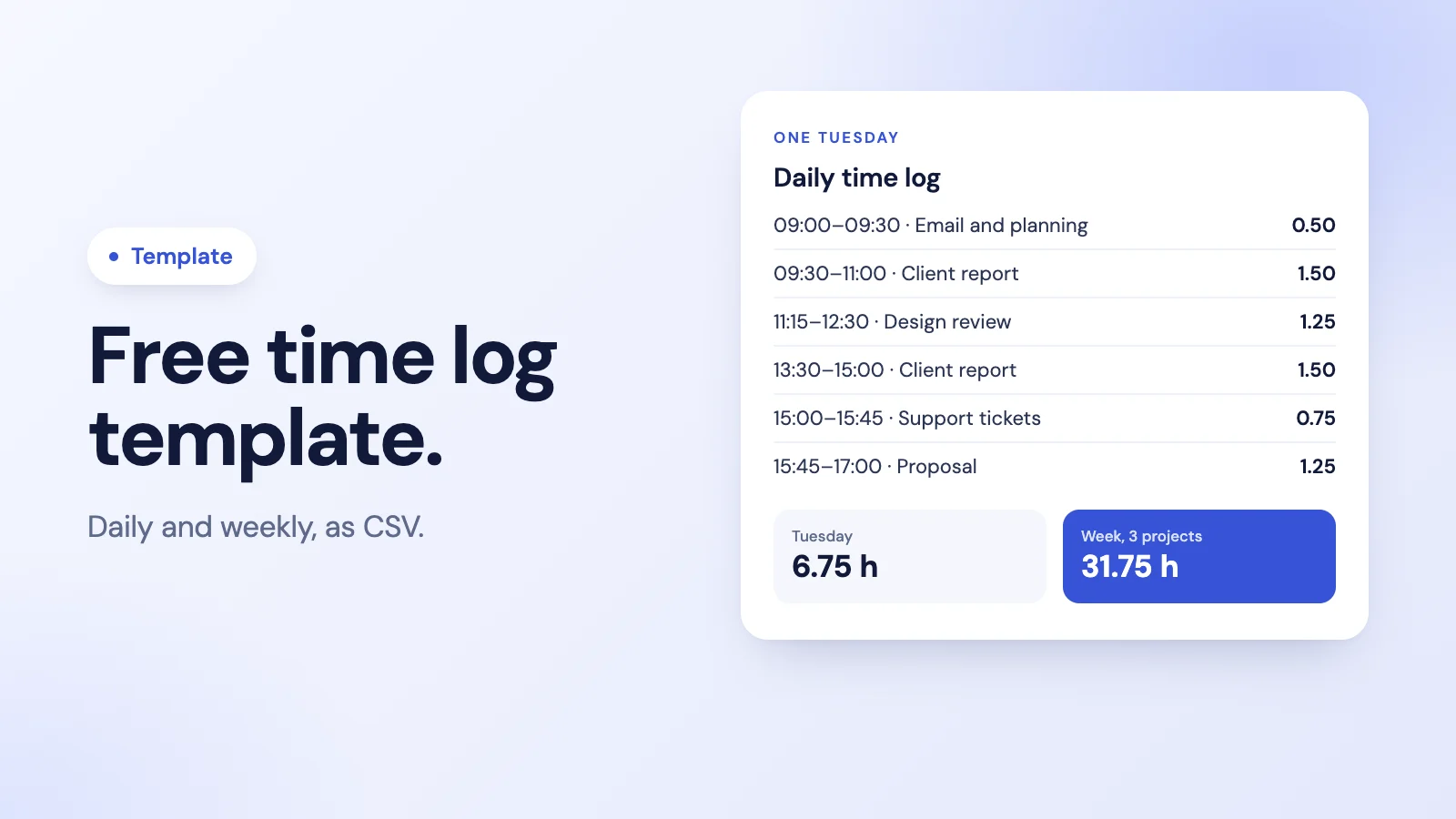
| Start | End | Activity | Project | Hours |
|---|---|---|---|---|
| 09:00 | 09:30 | Email and planning | Internal | 0.50 |
| 09:30 | 11:00 | Client report draft | Northwind | 1.50 |
| 11:15 | 12:30 | Design review call | Acme | 1.25 |
| 13:30 | 15:00 | Client report draft | Northwind | 1.50 |
| 15:00 | 15:45 | Support tickets | Internal | 0.75 |
| 15:45 | 17:00 | Proposal | Acme | 1.25 |
| Total | 6.75 |
The day ran from 09:00 to 17:00, eight hours on the clock. After a 15-minute break and an hour for lunch, 6.75 hours were logged against work: 3.0 for Northwind, 2.5 for Acme and 1.25 internal. If you are not sure how to turn minutes into decimal hours, see how to calculate hours worked.
How to use the weekly log
At the end of each day, add that day's hours per project to the weekly sheet. By Friday you have hours per project, per day and in total:
| Project | Mon | Tue | Wed | Thu | Fri | Total |
|---|---|---|---|---|---|---|
| Northwind | 2.00 | 3.00 | 1.50 | 2.50 | 1.00 | 10.00 |
| Acme | 1.50 | 2.50 | 3.00 | 1.00 | 2.00 | 10.00 |
| Internal | 3.00 | 1.25 | 2.50 | 3.00 | 2.00 | 11.75 |
| Total | 6.50 | 6.75 | 7.00 | 6.50 | 5.00 | 31.75 |
Tuesday's column matches the daily example above. Over the week, more than a third of the time went to internal work, which is often the most useful thing a time log reveals.
Tips for a time log you will keep
- Log as you go, not on Friday. Memory turns a messy week into a tidy one, and the tidy one is wrong.
- Use blocks, not minutes. Fifteen-minute blocks are accurate enough and quick to write.
- Keep the project list short. Five well-chosen projects beat thirty that nobody can tell apart.
- Review once a week. Compare the weekly total per project with what you planned, and adjust next week's plan.
- Decide what the log is for. Billing, planning and spotting overload each need slightly different columns.
When the log is used to bill clients or plan projects, our guide to project time tracking goes further.
When a template is no longer enough
Spreadsheets work well for one person or a small team. They start to strain when several people log time, totals have to be checked by hand, and hours feed into pay. That is the point where timesheet software saves more time than it costs.
Tickin records when people clock in and out, with breaks deducted, from Slack, the web or Microsoft Teams on the Scale plan, so the daily hours are captured without anyone filling in a sheet. On the Scale plan, people can also log time against project tasks. It is free for up to 10 employees. See time tracking in Tickin.
Frequently asked questions
What is a time log?
A record of what you worked on and when: each entry has a start time, an end time, the activity and usually the project or client. Added up, it shows where your time actually went over a day or a week.
What is the difference between a time log and a timesheet?
A timesheet records when someone clocked in and out and the hours worked each day, usually for pay. A time log records what the time was spent on, activity by activity. Many people keep a time log to understand their work and a timesheet for payroll.
How detailed should a time log be?
Detailed enough to answer your question, and no more. Fifteen-minute blocks by activity and project are enough for most people. Logging every five minutes takes longer than it is worth.
Can I open the templates in Excel or Google Sheets?
Yes. Both templates are CSV files that open in Excel, Google Sheets, Numbers or any spreadsheet app. Replace the sample rows with your own and adjust the columns to suit.
How does Tickin relate to a time log?
Tickin records when people clock in and out, with breaks deducted, so hours are captured automatically from Slack, the web or Microsoft Teams on the Scale plan. On the Scale plan, people can also log time against project tasks.
The takeaway
A time log is a few columns and a habit: what you worked on, from when to when, added up at the end of the day and the week. Start with the daily template, roll it up weekly, and review it every Friday against what you planned.