Employee Forgot to Clock Out? What to Do, and How to Stop It Happening
An employee forgot to clock out. How to fix the record fairly, what you still have to pay, the policy that prevents repeats, and how reminders close the gap.
Someone left at six and their clock is still running at nine the next morning. It happens on every team, usually to good people on busy days. The question is not how to stop it ever happening, because nobody manages that, but how to fix the record fairly when it does and how to make it rare.
This guide covers both: the steps to correct a missed clock-out, what you still owe, the policy that keeps it from turning into a dispute, and how reminders catch it before it becomes a problem.
Why a forgotten clock-out matters
A missed clock-out looks like a small clerical slip, but an open session does real damage if nobody catches it:
- Hours inflate. A session left open overnight can add twelve or more phantom hours to one day.
- Overtime goes wrong. Those phantom hours often land above the daily threshold, so they show up as overtime that was never worked. Our guide to tracking overtime fairly explains why overtime records need to be clean before anyone approves them.
- The next day breaks. Many systems refuse a new clock-in while the old session is still open, so the person's real working day gets lost inside yesterday's.
- Trust takes a hit. When the fix happens weeks later, at payroll, it turns into an argument about memory. That is how small gaps become attendance disputes.
What to do when an employee forgot to clock out
Handle it the same way every time, so nobody feels singled out.
- Ask the employee first. They usually know when they stopped: "I left at 6:10 for school pickup." Their account is the starting point, not something to second-guess by default.
- Check it against something objective. Their last message, the last time they used a work system, a shared calendar, or a colleague who saw them leave. You are confirming, not investigating.
- Correct the record to the real end time. Not to the scheduled end time, and not to the moment someone noticed. The goal is the time they actually stopped working.
- Write down who changed it and why. A one-line note ("Corrected to 18:10, employee confirmed, last Slack message 18:04") makes the change defensible later.
- Recalculate anything downstream. Worked hours, breaks and overtime for that day should follow the corrected time, not the open session.
If the employee is the one who notices, the cleanest route is a correction request they submit themselves, approved by a manager. It keeps the person who knows the facts in charge of the first draft and gives you a record of who agreed to it.
What you still have to pay
The rule of thumb is simple: pay for the time actually worked. A missed punch does not change what someone earned.
That cuts both ways. You should not pay twelve hours because a clock ran overnight, and you should not dock pay because a punch was missed. In many places, including under US federal law, employers must pay for all hours worked and can deal with repeated timekeeping mistakes through policy instead. If someone genuinely worked late, that time counts, and it may be overtime under your overtime pay rules.
Rules differ by country and region, so check what applies where your team works. This guide is not legal advice.
A simple forgot-to-clock-out policy
A short written policy turns an awkward conversation into a routine one. It should answer five questions:
- What counts as a missed clock-out? Any session still open after the person stopped working.
- How is it fixed? The employee submits a correction with the real end time and a short reason; a manager approves it.
- By when? Within a day or two, while everyone still remembers.
- What is paid? The corrected hours, nothing more and nothing less.
- What happens if it keeps happening? A reminder first, then a conversation about what gets in the way. Repeated misses usually point to a clunky process, not a careless person.
If you already have an attendance policy, add this as a short section rather than a separate document.
How to stop it happening
Most forgotten clock-outs have one of three causes, and each has a fix.
Clocking out lives somewhere people do not go at the end of the day. If the time clock is a separate app, people forget it. Put it where they already are. Teams that clock in and out from Slack close the session in the same place they say goodbye.
Nothing notices when a session runs long. A clock that runs silently for fourteen hours is the real failure. A reminder at the point someone has done their usual day catches it the same evening, not at month-end.
Nothing closes a session nobody answers for. If reminders go unanswered, something still has to end the session, or it keeps running into tomorrow.
How Tickin handles a forgotten clock-out
Tickin follows that pattern on every plan, using each person's own target hours for the day rather than one workspace-wide number.
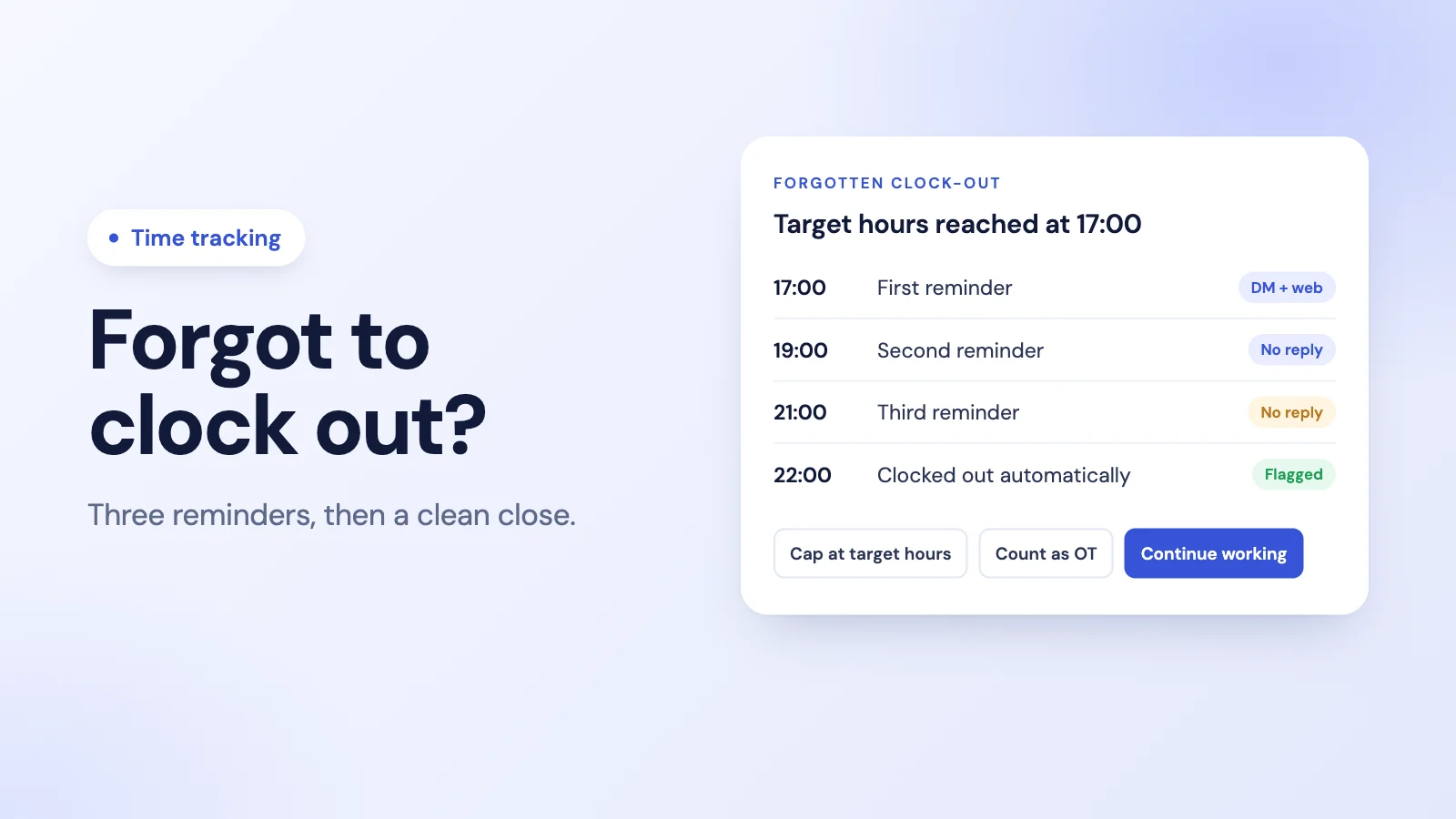
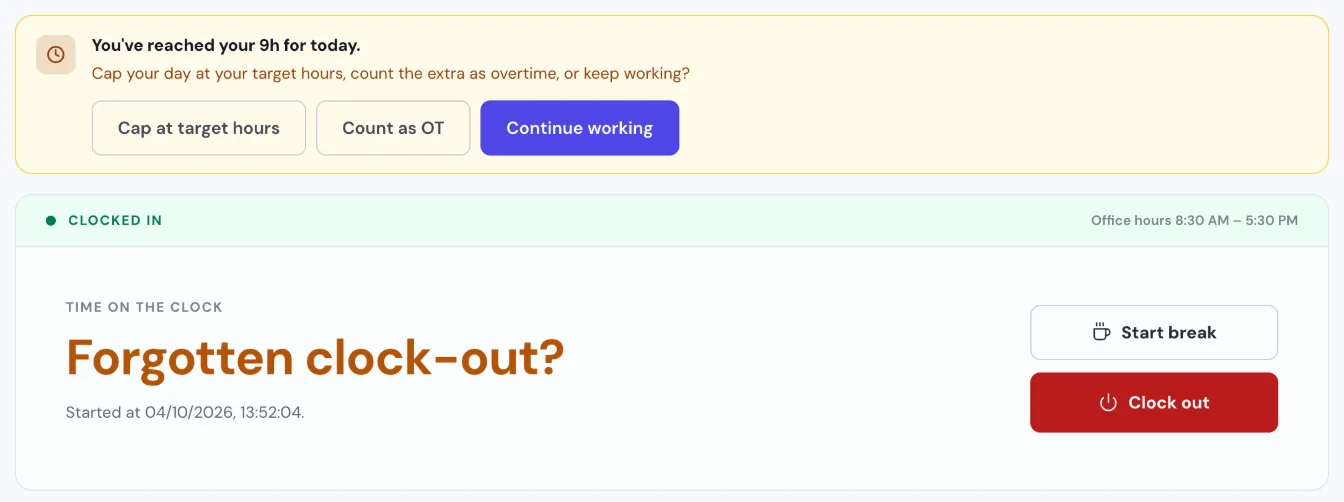
A reminder at target hours. When someone reaches their target hours and is still clocked in, Tickin reminds them in a Slack DM and on the web, and in Microsoft Teams on the Scale plan: "You've reached your 9h for today", with their own target hours. On the Free and Starter plans it asks them to clock out now or keep working, with Clock out and Continue working buttons. On Growth and Scale the buttons are Cap at target hours, Count as OT and Continue working.
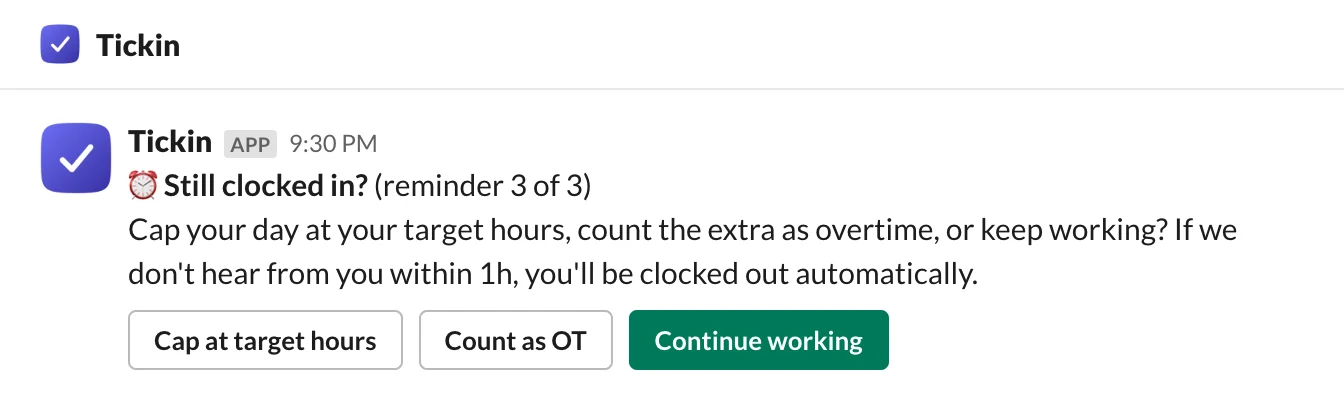
Two more chances. With no reply, Tickin asks "Still clocked in?" after 2 hours and again 2 hours later. The last reminder says they will be clocked out automatically if Tickin does not hear back within an hour. Pressing Continue working or starting a break restarts the reminders.
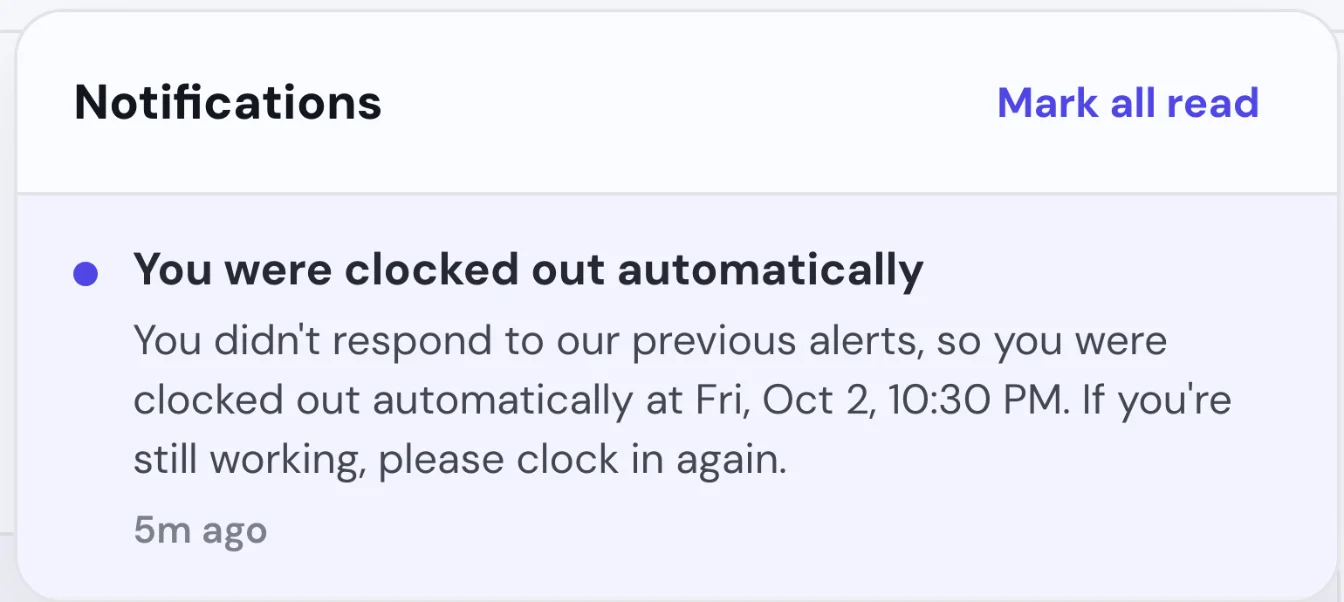
A clean close if nobody answers. An hour after the third reminder, Tickin clocks the person out and tells them so, asking them to clock in again if they are still working. Admins are notified too.
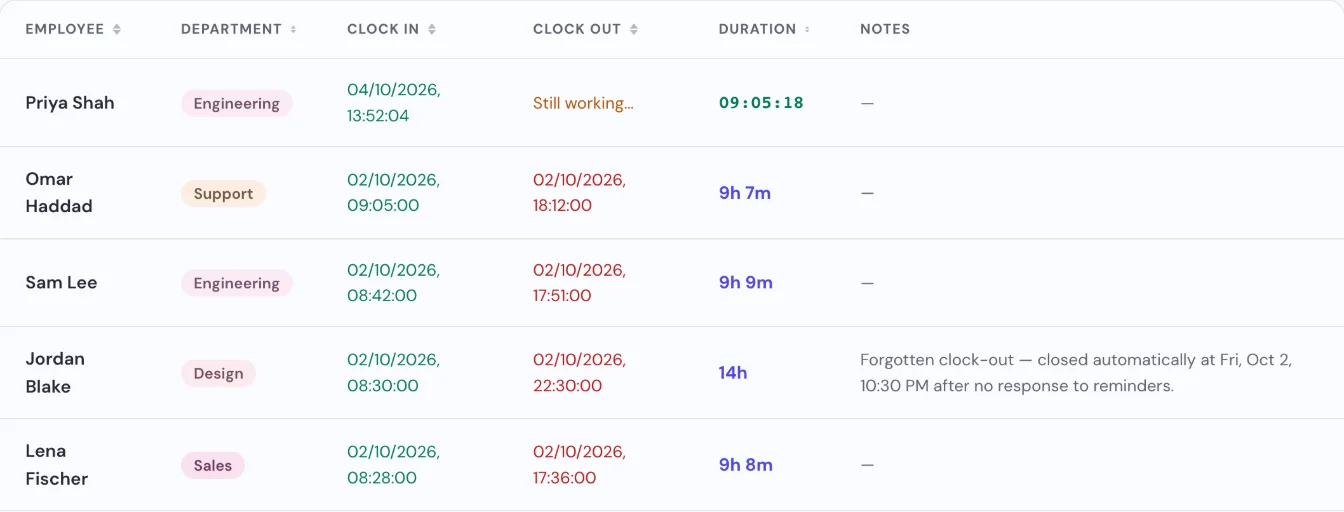
Easy to find and check. The session is flagged "Forgotten clock-out" in the record, with the time it was closed, so an admin can spot it and confirm the real hours.
Fair hours either way. The closed session counts the person's target hours. On Growth and Scale, any extra time after an automatic clock-out becomes a pending overtime request, tagged "No response — possible forgotten clock-out", that an admin has to approve. It is never approved automatically, so a forgotten evening cannot quietly turn into paid overtime.
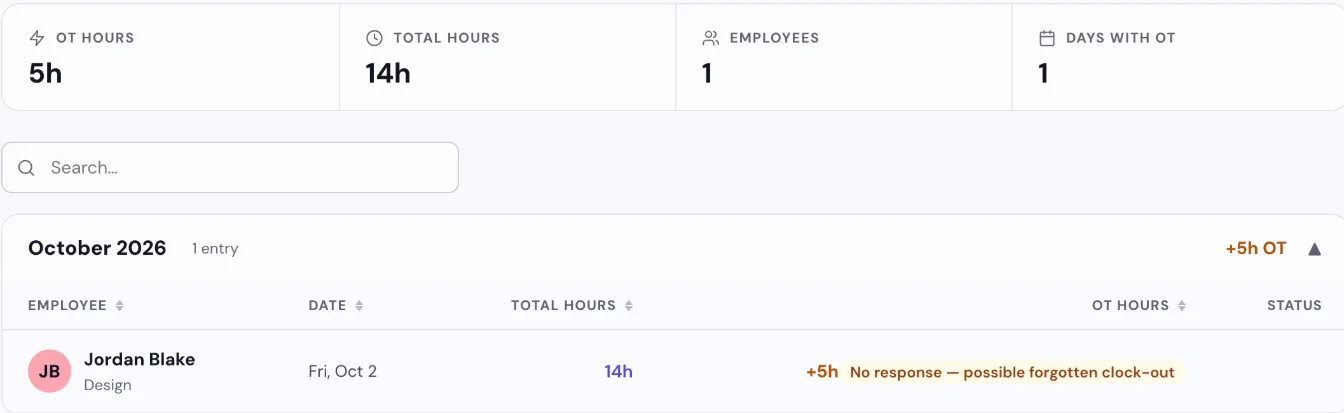
Corrections stay simple. If the recorded times are wrong, the employee can request an attendance adjustment with the real end time, or an admin can correct it (through an adjustment, including on someone's behalf). You can read more on the time tracking page, and if your team clocks hours on shared sheets today, our timesheet template shows the fields a clean record needs.
Frequently asked questions
What should I do when an employee forgot to clock out?
Ask the employee when they actually stopped working, check it against anything objective you have (last message, last system activity, a colleague's account), correct the record to that time, and note who made the change and why. Do not guess silently, and do not leave an open session to inflate their hours or overtime.
Do I still have to pay for the time if someone forgot to clock out?
You pay for the time they actually worked, not for the time the clock ran and not less because a punch was missed. In many places, including under US federal law, an employer must pay for all hours worked, but can address repeated timekeeping mistakes through its normal policy. Check the rules where you operate.
Can I discipline an employee for forgetting to clock out?
A clear timekeeping policy can set out what happens after repeated missed punches, starting with a reminder and a conversation. It is wise to treat a first miss as an honest mistake, and to fix the cause, such as an awkward clock-out step, before reaching for discipline.
How do I stop employees forgetting to clock out?
Make clocking out part of a routine people already have, put it where they already work, and send a reminder when someone is still clocked in well past their usual hours. A tool that follows up and closes a session nobody answers for stops a forgotten clock-out from running on for days.
What happens in Tickin if someone forgets to clock out?
At their own target hours Tickin sends a reminder in a Slack DM and on the web (and in Microsoft Teams on the Scale plan), then again after 2 hours and 2 hours after that. An hour after the third reminder with no reply, it clocks them out, tells them to clock in again if they are still working, notifies admins, and flags the session "Forgotten clock-out".
The takeaway
A forgotten clock-out is a normal mistake with an easy fix, as long as you catch it the same day. Correct the record to the real end time, pay for the hours actually worked, keep a note of the change, and put a reminder in front of people before the clock runs overnight. Once you have the end time right, our guide to calculating hours worked walks through turning clock times into payable hours.