Best Leave Management Software for Small Teams (2026)
Six leave management tools for small teams compared on price, free plans, Slack and Teams approvals, half days and holidays: Tickin, Timetastic, Vacation Tracker, BambooHR, Calamari and Leave Dates.
Leave management software replaces the spreadsheet, the email thread and the "who's out tomorrow?" message with one place where people request time off, approvers decide and balances stay right. For a small team, the best leave management tool is usually the one that fits where your team already works and doesn't charge you for seats you don't have.
This guide compares six tools on what matters to small teams: price and free plans, approvals in Slack and Microsoft Teams, half days, holidays and what each one is honestly best at. Prices and features come from each company's own pricing and feature pages as of October 2026. Plans change, so check the current terms before you commit.
TL;DR
- Free for a small team, inside Slack: Tickin, free for up to 10 employees, with leave tied to attendance.
- Simple and focused: Timetastic, a long-standing leave planner with Slack approvals.
- Built for Slack and Teams: Vacation Tracker, with accruals and hourly leave on its higher plan.
- A full HR system: BambooHR, if you need far more than leave.
- Multi-country rules: Calamari, with accrual, carryover and per-country holiday calendars.
- Lowest per-seat price: Leave Dates.
The six tools at a glance
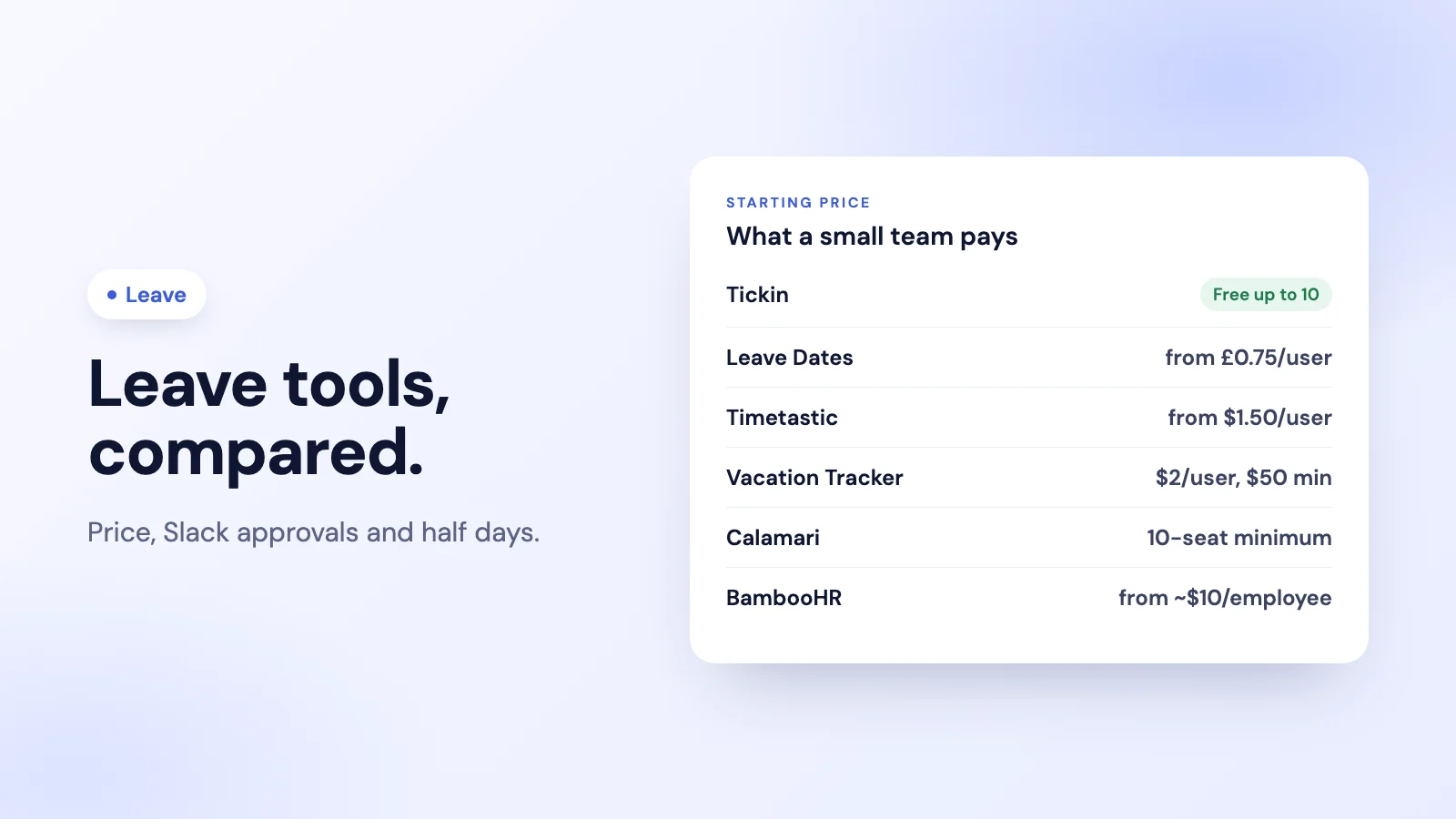
| Tool | Free plan | Paid plans from | Approve in Slack | Microsoft Teams | Half days |
|---|---|---|---|---|---|
| Tickin | Up to 10 employees | $2 per employee a month (Starter) | Yes | Yes, on the Scale plan | Yes, every plan |
| Timetastic | No (30-day trial) | $1.50 per user a month, billed monthly | Yes | Listed on its Pro plan | Check its site |
| Vacation Tracker | No (14-day trial) | $2 per user a month, $50 monthly minimum | Yes | Request through its Teams bot | Yes |
| BambooHR | No | Core from about $10 per employee a month, or a flat monthly price for 25 or fewer employees | Requests only | Not listed | Check its site |
| Calamari | No (14-day trial) | Modular pricing, 10-seat minimum | Yes | View absences and balances | Leave in hours or days |
| Leave Dates | No (30-day trial) | From £0.75 per user a month | Daily summary only | Not listed | Allowances in days or hours |
Sources: each company's own pricing and feature pages, October 2026.
1. Tickin: leave, attendance and Slack in one tool
Tickin is a leave management tool and time clock in one, run from Slack, the web portal, and Microsoft Teams on the Scale plan. Employees request leave in a couple of taps, approvers decide with Approve and Decline buttons in the chat, and the requester is told the outcome automatically. On Free and Starter an admin approves each request; on Growth and Scale the team lead approves first and an admin gives the final approval.
Each leave type has a yearly entitlement that renews on the person's work anniversary, half days (morning or afternoon) work on every plan, and admins can add their own leave types. Because leave lives next to attendance, an approved day off counts against required hours automatically, and a daily leave and work-from-home report in Slack shows who is out before the day starts.
Price: free for up to 10 employees, then $2 per employee a month on Starter. Best for: small teams in Slack that want leave and attendance without a second tool. Honest weakness: no per-pay-period accrual schedules or hourly leave, Microsoft Teams is on the Scale plan only, and there is no native phone app (on a phone, people use the Slack app or the mobile browser).
See Tickin's leave management tool, or how leave management in Slack works day to day.
2. Timetastic: a simple, focused leave planner
Timetastic does one job: it keeps a shared calendar of who is off and makes requesting and approving leave easy. Its Slack integration lets managers approve or decline in one tap from a direct message, and it can post a daily summary of who is off. Its pricing page lists public holidays for over 3,000 regions and accrual on its Pro plan.
Price: Business from $1.50 and Pro from $2.50 per user a month, billed monthly (there is no annual plan), with a 30-day free trial. Best for: small teams that want a dedicated, easy leave calendar. Honest weakness: no free plan and no annual discount. Its pricing table lists Microsoft Teams on the Pro plan, but its feature pages say little about it, so confirm Teams support and half days on its site.
For a side-by-side view, see Tickin vs Timetastic.
3. Vacation Tracker: built for Slack and Microsoft Teams
Vacation Tracker is designed around chat: employees request leave and managers approve it in Slack, and it also runs as a bot in Microsoft Teams. Half days are on both plans; hourly leave and accrual policies are on its Complete plan.
Price: Core from $2 per user a month with a $50 monthly minimum, Complete from $4 with a $100 minimum, plus a 14-day trial. Best for: teams of 25 or more that live in Slack or Teams and want accrual rules. Honest weakness: the monthly minimum means a team of 10 pays the same as a team of 25.
For a side-by-side view, see Tickin vs Vacation Tracker.
4. BambooHR: leave inside a full HR system
BambooHR is a complete HR platform: employee records, onboarding, performance, payroll in some countries, and time off as one module among many. Its Slack app lets employees request time off and check balances, with approvers notified.
Price: Core from about $10 per employee a month, or a flat monthly price for companies with 25 or fewer employees (shown on its pricing page). No free plan. Best for: companies that want one HR system of record and treat leave as part of it. Honest weakness: expensive if leave is all you need, and its Slack app is built for requests and notifications rather than approving in the chat.
5. Calamari: leave and attendance for multi-country teams
Calamari covers leave and attendance, with leave in hours or days, automatic accrual and carryover, and several holiday calendars per country or branch. In Slack, people can request leave, approve it and check balances; in Microsoft Teams they can view absences and balances.
Price: modular pricing per module, with a 10-seat minimum and a 14-day trial. Check its pricing page for the current figures. Best for: teams across several countries with different leave rules. Honest weakness: the 10-seat minimum and module pricing make it harder to estimate for a very small team.
For a side-by-side view, see Tickin vs Calamari.
6. Leave Dates: the lowest per-seat price
Leave Dates is a straightforward leave planner with allowances in days or hours, carryover on every plan, and public holidays imported from more than 230 countries.
Price: from £0.75 per user a month, with 25% off when paid yearly and a 30-day trial. Best for: budget-conscious teams that want a simple shared leave calendar. Honest weakness: its Slack integration posts a daily summary rather than handling approvals, and Microsoft Teams is not listed.
How to choose a leave management tool
- Start where your team works. If requests and approvals happen in Slack or Teams, people actually use the tool. Check whether approval happens in the chat, not just a notification.
- Price your real headcount. Monthly minimums and seat minimums can make a cheap per-user price expensive for a team of eight.
- Write down your leave rules. Fixed yearly allowances are simple; per-pay-period accrual, carryover and several countries need a tool built for them. Our guide to calculating PTO accrual explains the difference.
- Decide whether leave should touch attendance and pay. If an approved day off should change required hours or payroll, a tool that holds both saves reconciling two systems.
For the policy side, our guide to leave management for small teams covers what to decide before you choose software, and the free leave policy template is a good starting point.
Frequently asked questions
What is the best leave management software for a small team?
It depends on where your team works and what else you need. For approvals inside Slack, Tickin, Vacation Tracker and Timetastic all work well; Tickin is free for up to 10 employees and adds attendance. For a full HR system, BambooHR. For multi-country teams with complex accrual rules, Calamari. For the lowest per-seat price, Leave Dates.
Is there free leave management software?
Tickin is free for up to 10 employees, including leave requests, approvals and balances. The other tools in this comparison offer free trials rather than free plans, according to their pricing pages as of October 2026.
Can employees request and approve leave in Slack?
Yes, with several of these tools. Tickin, Vacation Tracker, Timetastic and Calamari all let approvers decide in Slack. Some tools only post notifications or summaries to Slack, so check whether approval itself happens in the chat.
What should leave management software include?
At minimum: requests and approvals, balances per leave type, half days, a public holiday calendar and a view of who is out today. Beyond that, decide whether you need accrual rules, carryover, multiple countries, or a link to attendance and payroll.
The takeaway
There is no single best leave management software, only the best fit for your team's size, rules and chat tool. For a small team in Slack that wants leave and attendance in one place, Tickin is free for up to 10 people. For a dedicated leave calendar, look at Timetastic or Leave Dates; for chat-first approvals with accruals, Vacation Tracker; for a full HR system, BambooHR; and for several countries, Calamari. Whichever you pick, check the current plan terms on the company's own pricing page first.